Best Budgeting Apps for Mac Users
We earn a commission from the offers on this page, which influences which offers are displayed and how and where the offers appear. Learn more here.
By Rob Berger, JD | Last Updated August 27, 2026
Budgeting apps can help you track expenses, plan for upcoming bills, and get a handle on your money. Mac users can choose between apps designed specifically for Mac, offering seamless integration and bank syncing, or a cloud-based app, where you can access your information from any device. Both options work well, but the right fit depends on how hands-on you want to be, how much automation you prefer, and whether you need features beyond basic budgeting.
Overview of Our Favorite Budgeting Apps for Mac Users
Monarch Money
Price: 50% Off Core Plan the First Year w/ Promo Code ROB50.Monarch Money offers a sleek, customizable interface that works seamlessly across devices. Its shared account access and balanced approach make it ideal for couples or anyone wanting a modern, visually engaging way to track money and net worth.

Quicken Classic for Mac
Price: Starts at $6.99/mo. billed annually.Quicken Classic for Mac is the best choice for Mac users who want powerful tools for managing complex finances, investments, and detailed reports. It offers more control and sophistication than many cloud-based or minimalist budgeting apps.

Quicken Classic Business & Personal for Mac
Price: $12.49/mo. billed annuallyQuicken Classic Business & Personal for Mac is an excellent choice for small business owners and those with a side hustle. Track cash flow, invoicing and even client gift lists. Account for rental properties and deduct mileage.
Best Budgeting Apps for Mac Users
Monarch Money
Connect and manage all of your accounts in one slick, colorful app. Monarch Money is perfect for couples/partners because you can share all of your accounts so both of you know what’s going on. It’s highly customizable, and you can get reports on income, spending, cash flow, net worth–and see how it trends over time. And if you often spend money on Amazon and then have no idea what you bought, Monarch can (with an extension) break it down for you and categorize what you bought.
While it’s not a native MacOS app, it works seamlessly through a browser on Mac and you can also get it on your phone and/or iPad. Monarch is either $99 yearly, or $14.99 a month, but you can get 50% off the Core Plan your first year with the promo code ROB50.
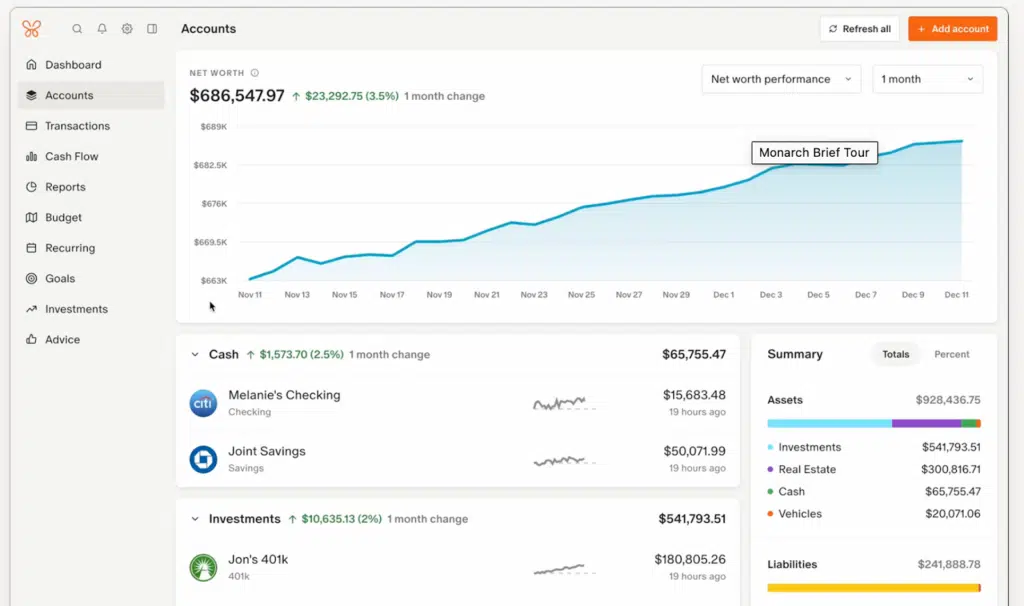
Bottom line: Monarch Money is a good fit for Mac users who want a modern, all-in-one, visually friendly budgeting + net-worth tracking tool without committing to desktop software.
Read more: Monarch Money Review – Is it Really the Best Personal Finance App?
Quicken Classic for Mac
Quicken Classic for Mac is specifically for a MacOS and the oldest personal finance app available today. It’s smooth, responsive, and integrated with the Mac experience. It’s ideal for people who prefer desktop-level control, reliability, and traditional software. Data is stored locally. There is a companion app, but it’s very basic.
There are also some features that may differ between the Windows and the Mac version. The calendar on Mac doesn’t have a bar graph to visualize cash flow, and you can’t embed a graph into a report like you can in the Windows version. That said, Quicken for Mac has been updating and adding new features and bug fixes all the time.
There are three versions of Quicken for Mac: Quicken Premier, Quicken Deluxe, and Quicken Classic Business and Personal (all of these are also available for Windows).

Read more: Quicken Classic Business and Personal Review
Bottom line: Quicken Classic for Mac is perfect if you want a full-featured, Mac-native financial management solution rather than a minimalist budgeting app — especially for users with complex finances, investments, or who value offline/desktop control.
Rocket Money
Rocket Money’s claim to fame—or at least what separates it from every other budgeting app–is its ability to find and cancel subscriptions and negotiate bills for you. It can also help you set goals, track your spending and your net worth. It’s easy to learn, so if you’re new to budgeting, you will appreciate the simple interface.
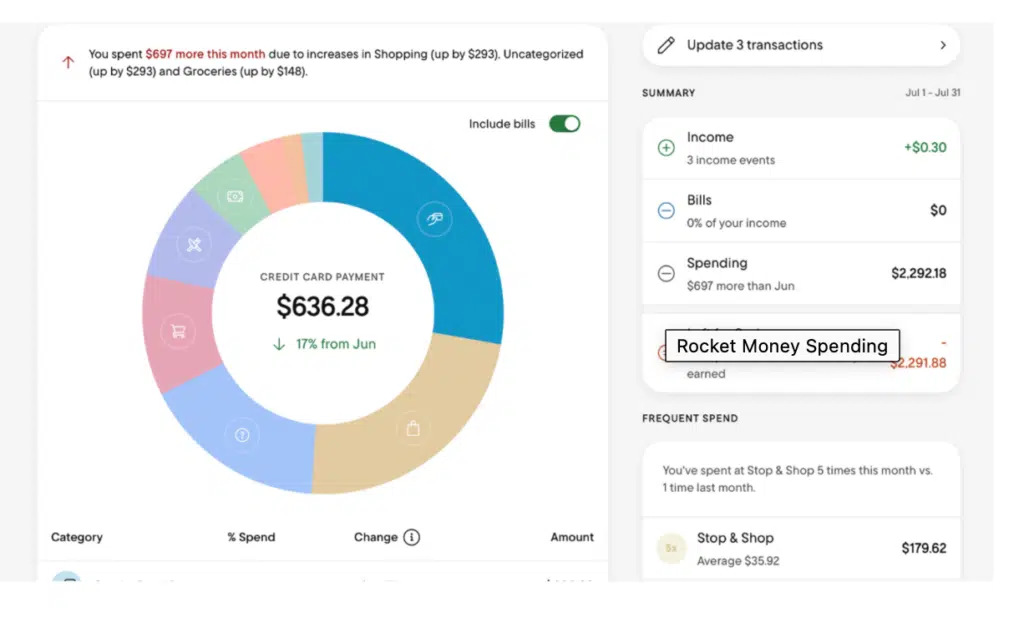
There is a free version of Rocket Money, but if you want the subscription cancellation and bill negotiation features, you’ll need the premium edition. It’s between $7 and $14, depending on how much you feel it’s worth.
Bottom line: Rocket Money is ideal for Mac users (via browser or mobile) who want to streamline recurring expense tracking, subscriptions, and get a simple snapshot of spending without heavy setup or maintenance.
Read more: Rocket Money Review
Empower
Not only does Empower work great with your Mac, but if you invest $100,000 they’ll send you an iPad. Invest $250,000 and you get a new MacBook (Limited time offer, terms and conditions apply).
Beyond that, Empower (formerly Personal Capital) offers robust long-term financial planning and investment tracking. It’s focused on wealth building, rather than budgeting (although there is a budgeting tool). You can plan for retirement, save money, track all your accounts and analyze your portfolio, all in one place.
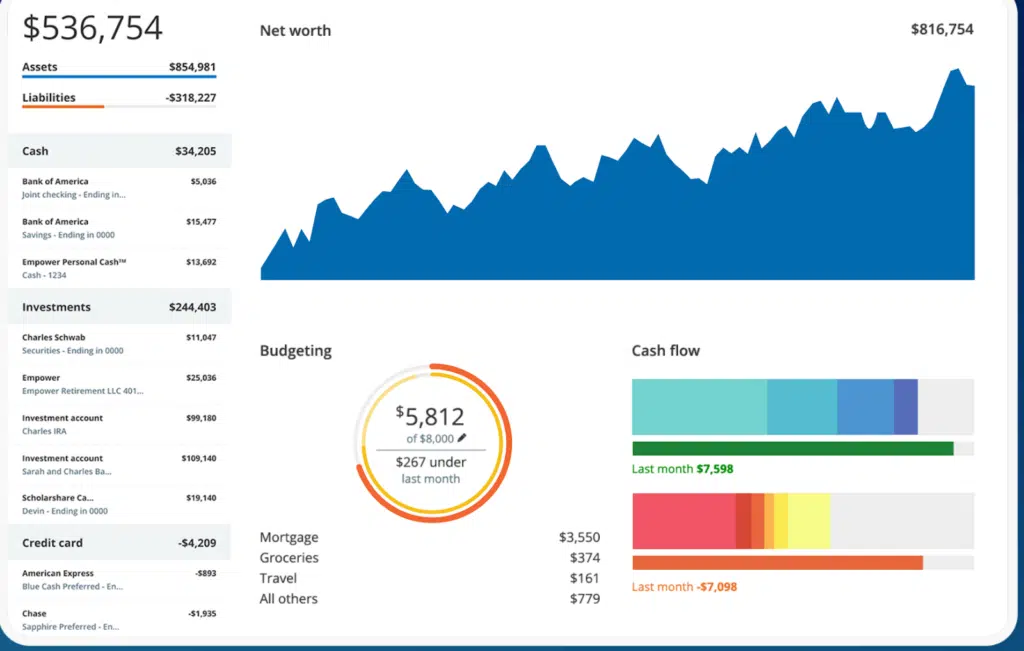
Since Empower is cloud-based, Mac users can access its financial tools from anywhere. And it’s completely free. The investment services, which advisors will offer you unless you state otherwise, are not free.
Bottom line: Empower suits Mac users looking for long-term money management, investments, and wealth tracking rather than just budget-by-month tools.
Read more: Empower Review and User’s Guide
YNAB (You Need a Budget)
YNAB is legendary among budgeting apps, though it’s not for everyone. If the thought of manually entering every single dollar you spend and “giving it a job” curdles your milk, then one of the more automated apps would suit you better.
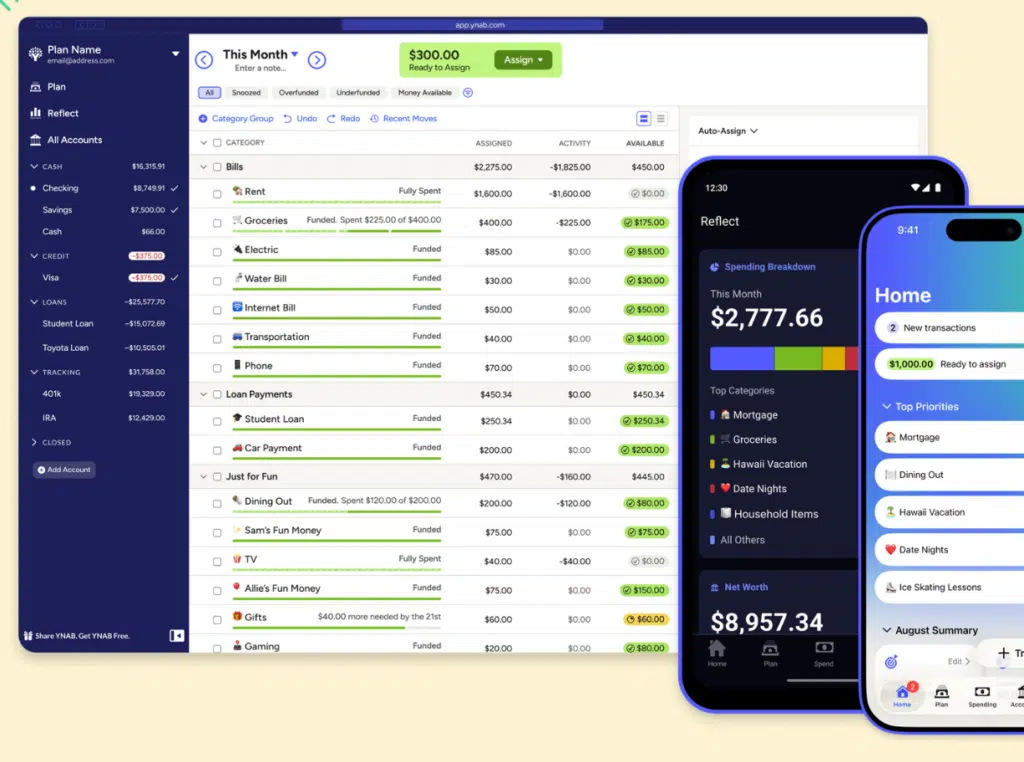
That said, YNAB users frequently use phrases like “life-changing” and “awesome.” On the other hand, new users frequently say things like “overwhelming” and “I don’t get it.” There is definitely a steep learning curve, but if you can stick with it, you can change your relationship with money and never worry about it again.
YNAB isn’t specifically for Mac, but it works great on a Mac browser, and you can access it on your computer, phone, and even offline.
YNAB offers a free 34-day trial. After that, it’s $109 if paid annually or $14.99 a month.
Bottom line: YNAB is ideal for Mac users who want to be hands-on with budgeting, want to instill stricter financial discipline, or need structure for variable income or tighter money control.
Copilot Money
Copilot Money is a budgeting/personal finance app that is only available for Mac, iPhone, iPad and Web. It’s slick and colorful, rivaling Monarch Money in how visually appealing it is.
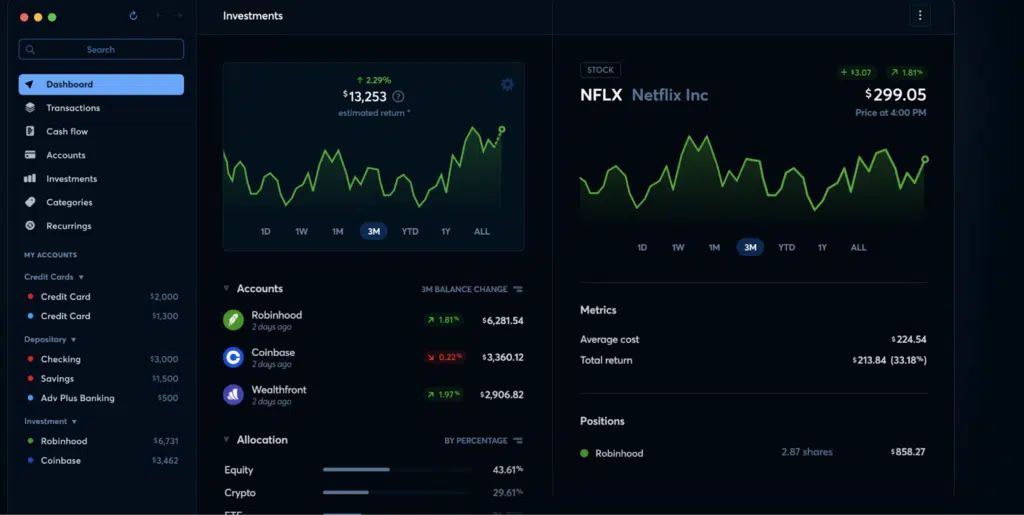
It offers budget tracking, savings, net worth, investment tracking, spending insights, real estate and it has AI-powered insights into your spending. It can even spot bank fees, subscriptions, and help you avoid overdrafts. Transactions are automatically synced and categorized, and they sync across all your devices–Mac, iPhone and iPad.
There is a 30-day free trial, which can be extended to two months if you use a code (which you can find on Reddit) when you sign up. After that, Copilot is $95 a year or $13 a month.
Bottom line: Copilot Money appeals to Mac (and Apple) users who want convenience — automated syncing, clean interface, and easy cross-device usage — without the rigidity or overhead of more hands-on budgeting systems.
PocketSmith
PocketSmith isn’t native to macOS, but it’s accessible via your browser and mobile. It has some powerful features, such as forecasting future cash flow and budgets to help you plan for the long-term. If you’re holding foreign currency or investments, PocketSmith can track that, too. It’s great for users who want insight into “what’s coming up.” You can add your partner as well, so both of you can see your spending in real time.
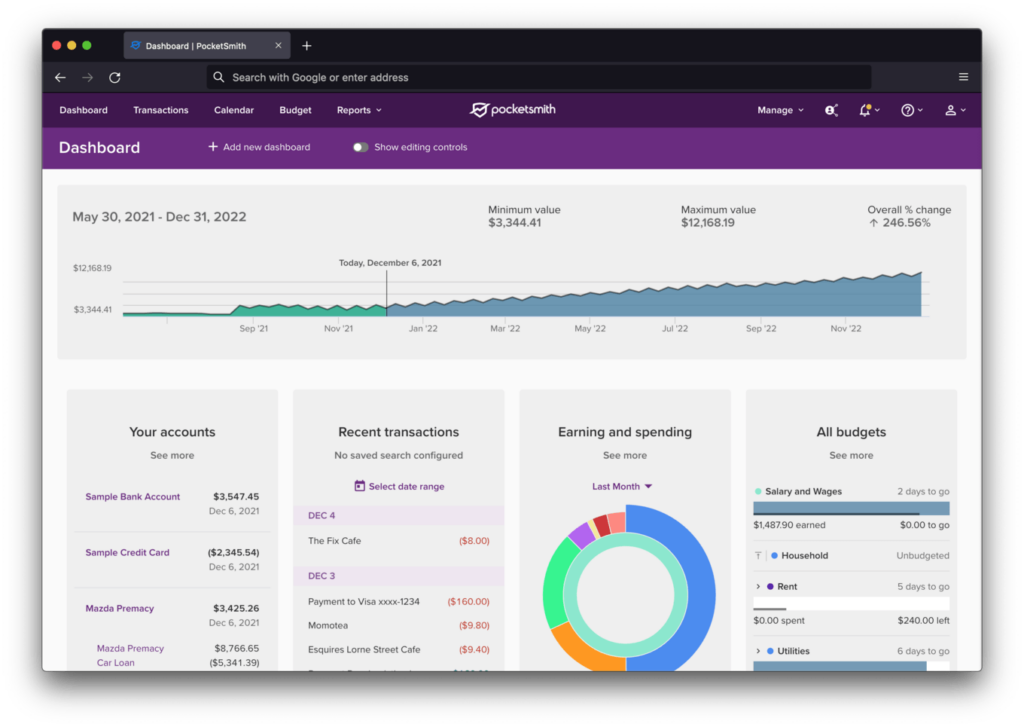
There are three tiers to PocketSmith pricing: $14.99 a month for the Foundation level, which includes automatic bank feeds, six dashboards and up to 10 years of projections; Flourish, which is $24.95 a month and includes everything in the Foundation level, plus you can connect up to 30 financial accounts and project up to 30 years. Then there’s the Fortune level, which is $39.95 a month and includes unlimited account connecting and projections for the rest of your life (60 years). There is a free plan, but it’s limited to two accounts and six month projections, plus you have to enter everything manually (no automatic syncing).
Bottom Line: Even though it’s not a native macOS app, its browser and mobile accessibility make it easy to use anywhere. PocketSmith’s standout feature is powerful forecasting that allows users to model future cash flow, budgets, and “what-if” scenarios over years or even decades.
Do You Really Need a Budgeting App Designed for Mac?
Most modern budget apps are not specifically designed for macOS, but since they are cloud-based, they can work anywhere and on any system. The exceptions to this are Quicken Classic for Mac and Copilot. Quicken Classic does have a windows version, but Copilot is only for Mac–if you don’t have a Mac or iphone, you can’t use Copilot.
Quicken Classic for Mac provides a full-featured native macOS application, and is best-suited to users who prefer local software and offline access. Copilot provides an Apple specific experience with great integration and syncing.
Cloud-based apps, on the other hand, allow you to check your finances from anywhere. They are synced in real-time, so you get up-to-the-minute information. You do have to have an internet connection, but that’s pretty easy to come by these days. The bottom line is it’s entirely up to you. Both have advantages and disadvantages, so choose the one that works for you.
How to Choose the Right Budgeting App for Your Mac
First, identify your budgeting style. Some apps have a zero-based budgeting system (YNAB and Rocket Money) while others have an envelope budgeting system, where you set a dollar amount for each category in your budget and stick to it.
Then, determine if you want a native macOS app or a cloud-based application. If you want an app native to macOS, you have two choices: Quicken Classic for Mac or Copilot. If you decide on a cloud-based app, you have many more to choose from.
Decide what features you need. Some apps are pure budgeting apps and others offer features such as investment tracking and retirement planning. Find one with the features you will use.
Price is also important. Most budgeting apps are subscription services (paid either annually or monthly), but if you only need a simple budget with fewer features, there are some free options, such as Empower and Rocket Money. Both of those come with ads, so consider how many ads or how much sales pressure you can tolerate.
Lastly, most apps come with a decent trial period. Figure out what you want in an app, then try out a few. Some may be more visually appealing, some you might find easier and more intuitive. But after you try out an app for a week or two, you should have a good idea about whether it will work for your situation.
Final Thoughts
It’s a great time to be a Mac user in need of a budget. You have many choices, from apps specific to the Apple universe to cloud-based applications. Test out a few and see which one works best for you.
