Rocket Money Review: Simplifying Subscriptions and Budgets
We earn a commission from the offers on this page, which influences which offers are displayed and how and where the offers appear. Learn more here.
Staying on top of your money shouldn’t feel like climbing Mount Everest every month. Yet between forgotten subscriptions, rising bills, and trying to actually stick to a budget, personal finance can get messy fast.
Enter Rocket Money, an app that promises to help you take control and stay on top of your finances. But, can it actually do the heavy lifting for you? We signed up for a free trial and put it to the test. Here’s our Rocket Money review.
Quick Take
Rocket Money is a personal finance app designed to simplify budgeting and help users take control of their finances. It connects to thousands of banks, credit cards, and other financial institutions, allowing users to track spending, subscriptions, bills, and net worth in one place. Rocket Money’s unique features include identifying forgotten subscriptions, offering a subscription cancellation service, and even negotiating bills on your behalf. In August 2026 it added Rowan, an AI agent on a new Premium Plus tier that watches your accounts and acts on them by text message.
What Is Rocket Money?
Rocket Money (formerly Truebill) is a personal finance app that helps you set goals, track your spending, create a budget, and monitor your net worth. Rocket Money’s biggest claim to fame, though, is finding and canceling unwanted subscriptions and negotiating with your providers to lower your bills. Rocket Money is available on desktop, for iPhones, and Android devices.
My Experience With Rocket Money
When you sign up for Rocket Money, you’ll answer questions about your financial goals.

Next, I connected my checking account and my credit cards. While Rocket Money insisted my Discover password was wrong (even though Discover accepted it), connecting other accounts, like Capital One, was seamless.
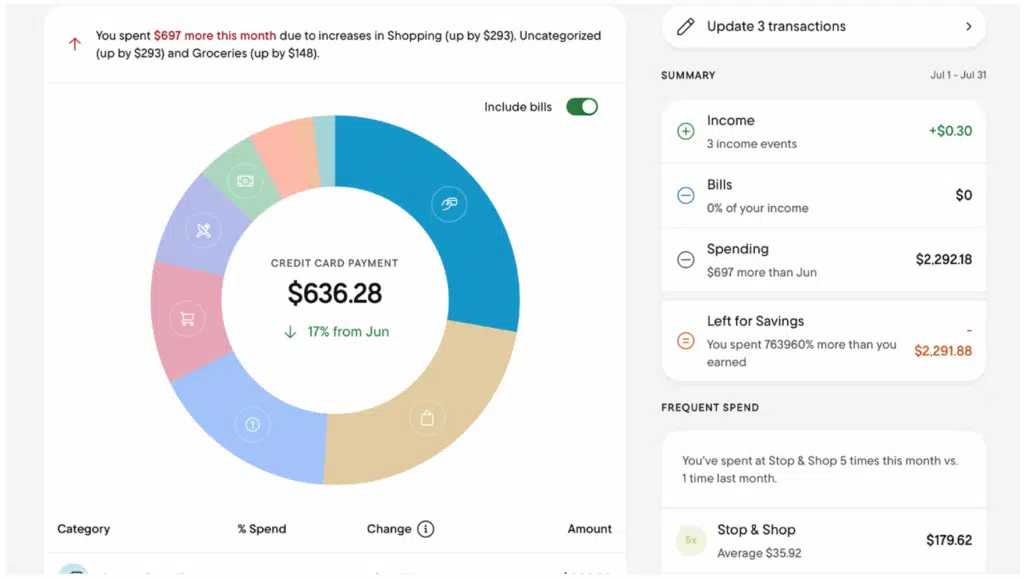
I quite like the look of the app (see the image below). It’s colorful and easy to read.
Tracking Subscriptions
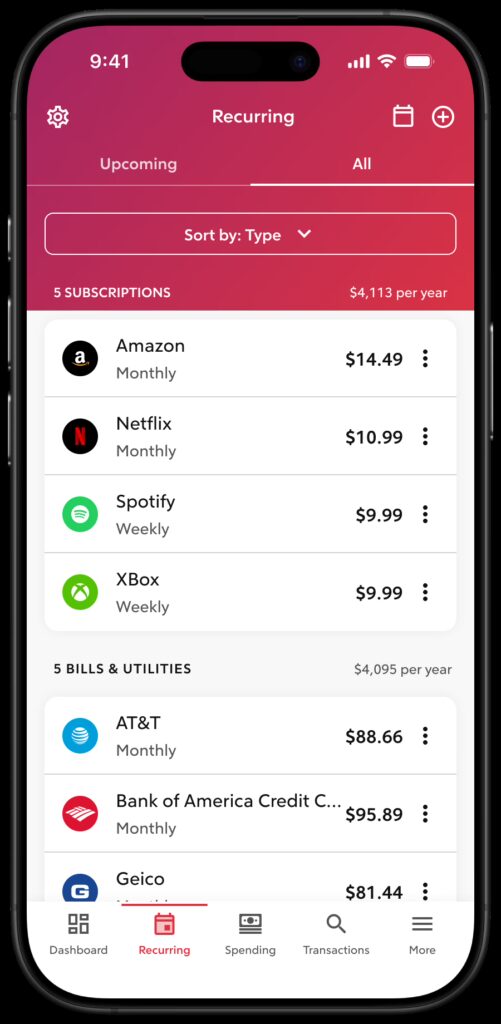
Rocket Money operates under the assumption that many people have forgotten subscriptions draining their accounts. There’s even a section in the dashboard where you can see a full list of all of your subscriptions. This makes it easy to identify which subscriptions you no longer use and therefore, which ones you may want to cancel.
I have three subscriptions and I use them all, so this feature of Rocket Money isn’t life-changing for me. But, if it’s important to you, you may also want to read our article on 7 Best Subscription Manager Apps to Track and Cancel Recurring Charges. Rocket Money is one of the top contenders on the list.
Bill Negotiation
Another Rocket Money unique feature is bill negotiation. Rocket Money can negotiate bills for you, but there are a couple of caveats:
First, in order to act as your agent with bill companies, note the following:
If it’s necessary for our agents to represent to your Provider that they’re the account holder, you consent to such representation solely in order to perform the Bill Negotiation.
Also, should Rocket Money negotiate your bill successfully and save you money, they will charge you a fee, according to their Terms of Service:
The current Negotiation Fee is decided by the user, anywhere between 35-60% of the 12-month savings achieved as a result of the negotiation.
For instance, if a 40% fee is chosen and Rocket Money is able to lower a bill by $10 per month, that would equal savings of $120 over 12 months and a Negotiation Fee of $48.
I didn’t have any bills I wanted Rocket Money to negotiate, so I did not test this feature firsthand.
Getting Started With Rocket Money
This part is interesting because Rocket Money offers two versions: a free version and a Premium version. But, you can’t choose the free version right off the bat. Instead, you need to sign up for a free trial of the Premium version. You can cancel the Premium trial within seven days, but Rocket Money takes your credit card information just in case you decide to keep the Premium version. I find this a bit annoying, although the app does offer excellent features in its free version.
Once I had an account, Rocket Money connected to my bank right away (less than a minute). As I mentioned before, Rocket Money insisted my password for my Discover credit card was incorrect, but it had no trouble linking to Capital One.
This is what the dashboard looks like:

Rocket Money Features
There are now three versions of Rocket Money: the free version, Premium, and a new Premium Plus tier that adds Rowan, the AI agent I cover in its own section below. For the Premium version, members can choose a payment anywhere between $7 and $14, depending on how much you feel the service is worth. There is also a 7-day free trial of Premium so you can try it out before you decide.
The Free version includes:
- Account linking: View checking, savings, credit cards, and investment accounts in one dashboard.
- Balance alerts: Get notifications for low balances or high credit card usage.
- Subscription management: Identify all recurring charges; cancellation is manual. It’s up to you to cancel any unwanted subscriptions.
- Spend tracking: Categorizes your expenses and highlights overspending.
- Budgeting: Tracks income vs. spending with preset categories (custom categories require Premium).
The Premium subscription includes everything in the free version, plus:
- Subscription cancellation assistant: Rocket Money will cancel unwanted subscriptions for you. You tell Rocket Money what subscriptions you don’t want and then it contacts those services and cancels them for you.
- Automated savings plan: Rocket Money will set aside a portion of every paycheck to reach financial goals.
- Credit score updates: You can check your credit score daily through Rocket Money.
- Net worth tracking: Rocket Money can track your assets vs. your debts to calculate your net worth. You can also include your home in this calculation if you switch the toggle on.
- Bill negotiation: As mentioned above, the bill negotiation feature is either the best thing since podcasts or almost a scam, depending on your perspective. It is true that Rocket Money will negotiate your bills for you, but then they claim a fee between 35% and 60% of the first year’s savings. Not only is there a fee, but the fee is somewhat hidden. We had to dig through the Terms of Service to find it.
On the positive side, it’s great that someone else will call your internet company and negotiate a lower payment; on the other hand, you could do that yourself.
Rowan: Rocket Money’s AI Agent
In August 2026, Rocket Money launched Rowan, and it’s the biggest change to this app since I first reviewed it. I’ve been using it, and I like it.
Here’s the distinction that matters. Almost every AI feature in a budgeting app is a chatbot. You ask it a question, it answers, and you still do the work. Rowan does the work. It monitors your accounts, texts you when it finds something, and then handles it when you tell it to.
According to Rocket Money, Rowan can:
- Catch price increases: It flags when a subscription or recurring service quietly raises your rate.
- Spot unexpected fees: It watches for charges you didn’t plan on and goes after a refund while there’s still time to get one.
- Cancel subscriptions: Sign up for a free streaming trial and never use it, and about three weeks later Rowan texts to ask whether you want to cancel before the first charge lands. Reply “cancel,” and it contacts the service and confirms when it’s done.
- Renegotiate bills and automate savings: The same agent can work on lowering recurring bills and setting up automatic transfers into savings.
All of it happens over text message. There’s no new dashboard to check, and I think that’s the smartest decision they made. A feature like this only works if you don’t have to remember to use it.
Two things to know before you get excited. First, Rowan isn’t generally available yet. It launched to a limited group of subscribers, with a wider rollout promised later in 2026, and everyone else joins a waitlist. Second, Rocket Money hasn’t published an official Premium Plus price. I upgraded, and it costs me $15 a month, which is just above the top of the $7 to $14 Premium range. Treat that as my number rather than a quote.
One caution, and it’s the same one I’d give about any agent. Rocket Money’s existing subscription-cancellation service already requires you to let the company act on your behalf, so this isn’t brand new territory for the app. But Rowan widens it. Before you turn it on, find out what it’s allowed to do without checking with you first, where you can see a log of what it has already done, and how you shut it off. Read those setup screens instead of tapping through them.
Is Rocket Money Safe?
Rocket Money uses Plaid to connect to over 12,000 banks and financial institutions globally. Plaid is an industry-leading account aggregator used by more than 7,000 apps. Rocket Money also uses bank-level encryption to keep your account information secure. You can elect to use multi-factor authorization as well.
Rocket Money is hosted on secure AWS (Amazon) servers. AWS is the hosting service for the likes of the Department of Homeland Defense and NASA. Rocket Money also uses bank-level 256-bit encryption
Rocket Money does not sell your data to any third parties.
Rocket Money Pricing
Rocket Money now offers three plans: a free version, Premium, and Premium Plus. Here’s exactly what each tier costs and what you get.
Free vs Premium Comparison
| Feature | Free | Premium | Premium Plus |
|---|---|---|---|
| Subscription tracking | ✅ | ✅ | ✅ |
| Subscription cancellation | ❌ | ✅ | ✅ |
| Spending, transaction & bill monitoring | ✅ | ✅ | ✅ |
| Bill negotiation | ✅ (35–60% success fee) | ✅ (35–60% success fee) | ✅ (35–60% success fee) |
| Smart savings (automated transfers) & Goals | ❌ | ✅ | ✅ |
| Custom budgets & categories | Limited | ✅ | ✅ |
| Automate budget categories | ❌ | ✅ | ✅ |
| Split transactions into two or more categories | ❌ | ✅ | ✅ |
| Credit score monitoring | ❌ | ✅ | ✅ |
| Net worth tracking | ❌ | ✅ | ✅ |
| Create manual transactions | ❌ | ✅ | ✅ |
| Customizable dashboard | ❌ | ✅ | ✅ |
| Account sharing w/ second login | ❌ | ✅ | ✅ |
| Rowan AI agent (monitors and acts by text) | ❌ | ❌ | ✅ |
How Much Does Rocket Money Cost?
Premium pricing is choose-what-you-pay within a set range:
- Monthly: $7–14/month (you pick your price)
- Premium Plus: $15/month in my case. Rocket Money hasn’t published an official price for this tier yet, so treat that as what I paid rather than a quote. It’s what unlocks Rowan.
There’s a 7-day free trial of Premium, and the free tier is genuinely usable on its own — you can track subscriptions and monitor spending without paying anything, though cancelling them yourself is a manual job on the free plan.
Bill Negotiation Fees
Bill negotiation is available to both free and Premium users. Rocket Money’s team contacts your providers (internet, phone, cable, etc.) and negotiates a lower rate on your behalf.
- Fee: 35–60% of the first year’s savings
- If they don’t save you money, you pay nothing
This is where most of the ROI from Premium comes from. A single successful negotiation often pays for the entire annual subscription several times over.
Is Rocket Money Premium Worth It?
Short answer: Yes, if you need or want something more than basic budgeting. Even if you don’t use its subscription cancelling service, the extra budgeting features make Premium worth the cost for most users.
Rocket Money Alternatives
Rocket Money vs. Monarch Money
Monarch Money doesn’t negotiate bills, but it offers a complete picture of all household accounts and highly customizable budgeting. Monarch Money also allows you to connect your accounts with your partner’s accounts and gives each of you separate login access.
Monarch Money costs $8.33/month (paid yearly) versus Rocket Money’s $7–$14 Premium plan. Monarch Money does so much more than basic budgeting, though, and they offer a 50% discount off the first year with promo code ROB50. It may well be one of the best (if not the best) personal finance apps available right now. You can read our Monarch Money Review here.
While there is a free version of Rocket Money, you’ll need Premium to unlock the subscription cancellation and bill negotiation features. Monarch Money is better for advanced financial tracking, but if you’re looking for a free app, Rocket Money is a good choice.
Rocket Money vs. YNAB
YNAB is excellent at budgeting, teaching you to assign every dollar a job. If all you need is a budgeting app, YNAB is a good option. On the other hand, if you’re new to budgeting, YNAB is overwhelming at first and there is a steep learning curve. Rocket Money makes it much easier to get started.
YNAB is more expensive ($14.99/month or $109/year), and it lacks many of the features Rocket Money and other budgeting apps offer. Rocket Money is simpler, more beginner-friendly, and cheaper, but only offers a 7-day Premium trial.
Rocket Money vs. Simplifi
Simplifi is Quicken’s web-based and mobile personal finance app. Simplifi offers a simpler version of Quicken Classic, for people who want to track expenses and everyday spending. You can also create a savings plan, analyze investments, and plan for retirement. Simplifi has better investment analysis and tracking than Rocket Money, but Simplifi won’t negotiate bills for you.
There is no free version of Simplifi, nor is there a free trial, although there is a 30-day money back guarantee. However, Simplifi’s pricing is a reasonable $6.99 per month. Even better, at the time of this writing, Simplifi is down to a special offer of $3.49/month for the first year when you buy direct. If investment tracking matters, Simplifi is the stronger choice over Rocket Money.
On AI, the two have gone in different directions. Simplifi added Quicken Assist, an in-app chat that explains your spending and runs what-if scenarios but can’t act outside Simplifi. Rocket Money’s Rowan skips the chat and does things. Which you prefer depends on whether you want an AI that answers questions or one that takes items off your list.
Rocket Money Pros and Cons
FAQs
What is Rowan?
Rowan is the AI agent Rocket Money launched in August 2026. Rather than answering questions inside the app, it monitors your accounts and texts you when it finds something, like a subscription price increase, an unexpected fee, or a free trial about to convert to a paid plan. Tell it to cancel or to chase a refund, and it does the work and reports back. It requires the new Premium Plus tier and is still in limited release.
Is Rocket Money safe to use?
Yes, Rocket Money is safe to use. It uses 256-bit encryption to store your data, and uses Plaid to connect to your bank accounts. You can also turn on multi-factor authentication to access your account.
Does it actually cancel subscriptions?
Yes. The Premium version features a concierge service that will cancel your unwanted subscriptions for you. To do that, you have to agree that Rocket Money can act on your behalf. The free version identifies your subscriptions, but it’s up to you to cancel them (or keep them).
How does Bill Negotiation work?
You identify a bill you want Rocket Money to negotiate: say, your internet bill. Rocket Money’s team then contacts the internet service provider and tries to negotiate a lower price for you. If successful, Rocket Money will charge you between 35% and 60% of the savings. The user decides what percentage of the savings is appropriate for the fee. Also, beware, some users report the bill negotiation service doesn’t work as intended.
Can I use Rocket Money without Premium?
Yes. Anyone is welcome to use the free version if all you want is simple budgeting and expense tracking. To unlock all the features, you’ll need the Premium version, and Rowan requires the Premium Plus tier above that.
Final Thoughts
Rocket Money is beginner-friendly, visually appealing, and simplifies budgeting. It’s not ideal for advanced investment tracking, but if your goal is to consolidate accounts, manage subscriptions, and possibly save on bills, it’s worth considering. Its combination of ease of use, flexible pricing (including a free version), and its unique features make it a solid option for first-time personal finance app users.
Rowan changes the calculation a bit. If Rocket Money makes it work reliably, an AI that cancels the things you forgot about is a feature people will pay for without needing anyone to explain the benefit. That’s rare. I’d still want to see it out of limited release before calling it essential, but it’s the most interesting thing happening in this category right now.
