
Quicken Business & Personal Review – Can One Tool Handle Both Sides of Your Finances?
We earn a commission from the offers on this page, which influences which offers are displayed and how and where the offers appear. Learn more here.
Many freelancers or side hustlers learn this the hard way: mixing business and personal finances makes tax season a nightmare. Quicken Business & Personal, launched in January 2024, offers to solve that. It combines Quicken Simplifi with business tools and is designed to keep everything tidy, separate, and stress-free in one dashboard.
I signed up for a year of Quicken Business & Personal–more on that later. But this review includes my hands-on experience with the software, so you can decide if it’s right for you.
Quick Take
Quicken Business & Personal is an all-in-one finance app for people who manage both personal and small-business finances. It’s best for freelancers and the self-employed. It connects to thousands of banks, credit cards, and financial institutions, allowing users to track spending, income, business expenses, invoices, and cash flow in one place. Quicken Business & Personal combines the budgeting strengths of Simplifi with business tools like invoicing, mileage tracking, client management, and tax prep forms and reports.

What Is Quicken Business & Personal?
Quicken Business & Personal is a cloud-based tool built on the foundation of Quicken Simplifi. It includes all of Simplifi’s personal finance features and adds business capabilities for freelancers and the self-employed including:
- Invoicing
- Mileage tracking
- Client and project lists
- Built-in schedules for business and personal tax prep
- Basic reporting for small businesses
You also have the option of adding Quicken Lifehub, a digital filing cabinet for your family’s important documents. It can keep passwords, emergency plans, passport backups, medical information, emergency contacts, etc. for an extra $4/month. Though, Quicken occasionally offers a promotion where you can get Quicken Lifehub for the same price as Quicken Business & Personal.
Getting Started with Quicken Business & Personal
Quicken Business & Personal does not offer a free trial, but it does have a 30-day money back guarantee. If you previously had a subscription for Simplifi or any other Quicken product, you will not get the introductory price offered. Though, all of your data transfers seamlessly. All plans are billed annually, and all plans include a 30-day money back guarantee.
Installation and Setup
Set up is a breeze. As a previous Simplifi user, I logged back in. For first-time Simplifi users, you’ll create a username and password, and then you can begin adding your accounts.
Connecting Personal Accounts
- From the dashboard, click “New” in the Accounts section.
- Quicken will search its database of 14,000 supported financial institutions.
- Log in to your bank to connect your accounts securely.
- You can also add accounts manually if you prefer.
Connecting Business Accounts
- Navigate to the Business tab.
- Click Quick Setup.
- Add basic details (business name, structure, industry, accounting method).
- Upload a logo (optional).
- Add up to ten business accounts.
- If you manage multiple businesses, you can designate one as your primary.
Quicken Business & Personal Features
Dashboard / Overview
The dashboard shows both personal and business on the same screen, with the name of your business(s) and personal accounts shown on the left. You can click one or the other to display the transaction history, along with upcoming bill reminders for each account.
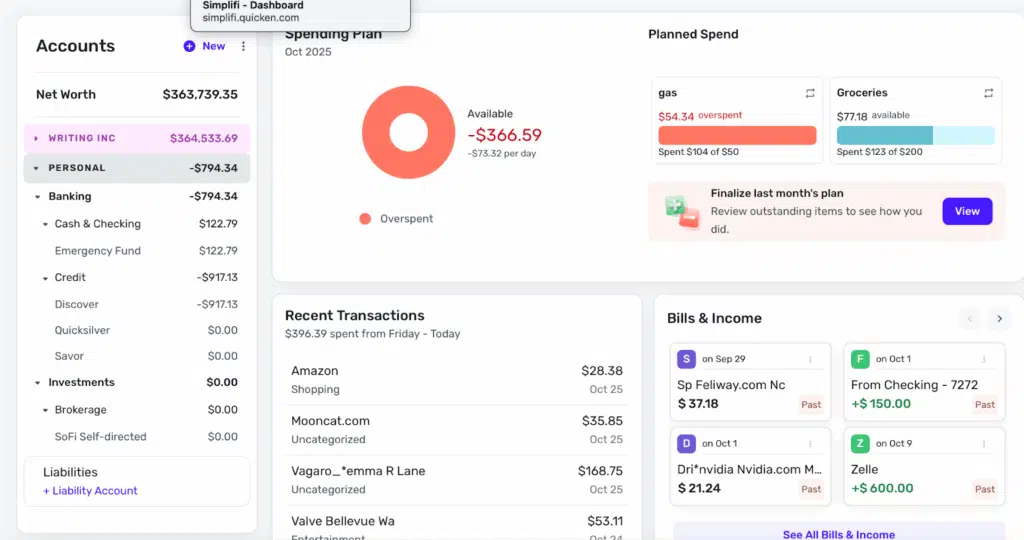
Income and expenses appear under “transaction activity.” Quicken sorts business from personal expenses by color, but you have to go through and mark which expenses are which, at least the first time. After that, Quicken recognizes previous expenses and applies the same category automatically. However, my bank has a “round up” feature, where it deposits the change from a transaction into savings, and Quicken seems to think this is a business transaction. Every time.
I probably shouldn’t find this as much fun as I do, but I enjoy how you can choose whatever color you want for all your business transactions.
If you regularly shop somewhere for both business and personal needs, such as Walmart or Amazon, you can split a transaction, which is easy to do. Click on the transaction and go to “Split.” You can then divide it by categories, tags, clients, whether it’s billable, and upload a receipt.
When tax time comes around, you can simply go to the “Reports” tab and click “Taxes.” This brings up a list of everything you mark as deductible during the year, making tax prep a breeze if you use this feature. You can’t file your taxes directly from the app, but you can export your information to either TurboTax or to your accountant.
Budgeting & Cash Flow Forecasting
Budgeting lives under “Planned Spend.” Quicken adds your expenses and savings goals and subtracts those from your income to come up with the amount you have available to spend. You can also look ahead, up to a year in advance, to see your future financial picture.
Business‑Specific Tools
If you’re a freelancer, consultant, solo LLC, or side hustler, Quicken’s small-business features cover most basic needs. On the left-hand side of the dashboard, underneath transactions you’ll find helpful tools including the following:
Clients and Projects: Here you can create a list of clients, last activity, if they’re ready to bill, and if that bill is paid or unpaid.
Sales and Billing: Create client invoices and see a list of paid, unpaid, and drafts. The estimates section allows you to maintain a list of clients, the amount you estimated, and whether that estimate was accepted or declined.
Mileage: Straightforward sheet to keep track of miles you drive for your business.
Tax Planner: Quicken Business & Personal can estimate your quarterly tax bill based on categorized business income and deduction expenses. If you shudder to think of how much you’ll owe in April, this is an easy way to keep on top of your taxes.
Payroll and Employees (Limited): You can also get a rough idea of payroll and employee expenses in Quicken Business & Personal by creating categories for those. However, it doesn’t have dedicated payroll tracking, and it doesn’t calculate taxes and withholding for you. For that, try Quickbooks Payroll or Gusto.
Personal Finance Tools
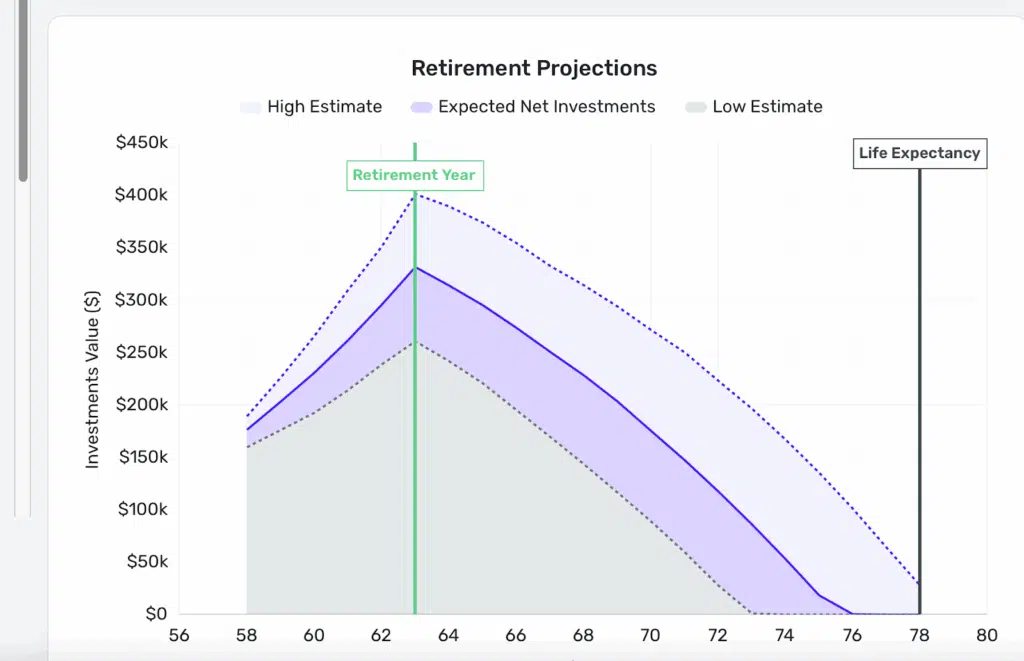
Quicken Business & Personal has all the personal finance features of Simplifi. You get bill pay reminders, spending plan, income and cash flow reports, a retirement planner and investment tracking. The retirement planning portion allows you to play with different scenarios including life expectancy, retirement contributions, and percentage increase on investments to come with projected retirement income. It uses your investment information if it has it; otherwise it uses generic information. But it’s a fun feature to explore.
Reports & Analytics
Business reports can be found by clicking your business name on the left hand side and then scrolling down to “Reports.” You can get reports for:
- Profit and loss
- Balance sheet
- Taxes
- Spending
- Income
- Income and expenses
- Savings
- Net worth
- Monthly summary
These exact same reports are available under your personal finances as well. You can filter the information by date range, categories, payees, tags, and clients and projects. You can toggle from business to personal with a simple click at the top, so everything is easy to find.
Integration & Syncing
Bank syncing is mostly seamless. Quicken easily connects with most banks and credit card companies–over 14,000 of them. Once it connects, it syncs data automatically. There are a few credit unions and very small banks that aren’t supported. In this case, you can manually download a file from your credit union and upload it into Quicken.
Quicken Business & Personal is available for desktop and the mobile app is available for both iPhones and Android devices.
Security & Privacy
Quicken Business & Personal uses bank-grade 256-bit encryption to protect your data. It also supports multi-factor authentication. Nothing is foolproof, but your data is as protected as possible.
Quicken Business & Personal Pricing
Quicken Business & Personal is $7.99 a month, billed annually at $95.88. There is no free trial but there is a money back guarantee within 30 days, so you can play with all the features and decide if it’s for you.
If you’ve never tried Quicken or any of its products, you might be able to get it cheaper for the first year–Quicken runs sales and promotions all the time.
Quicken Business & Personal Alternatives
Quickbooks
QuickBooks is accounting software that is also designed to help small-to-medium businesses manage their finances. There is no personal finance component, but if your business needs features like payroll, inventory management or managing international payments, QuickBooks could be perfect for you. It is more expensive; prices range from $38 to $275 a month, but if your business has outgrown Quicken Business & Personal it’s worth a look.
Freshbooks
There is no personal finance side to Freshbooks, but it does offer more sophisticated business features, especially for those with employees. Freshbooks has several tiers to choose from, depending on your needs, starting at $10.50 a month and going up from there. However, even the least expensive option allows you to accept credit cards for payments.
Wave
Wave has a lot of nice features, and you can try the Starter version for free. This version includes the ability to create estimates, invoices, and you can even accept online payments (for a small fee). The mobile app allows you to send invoices on the go. According to users on Reddit, you can use it to keep track of personal finances as well.
Quicken Classic
Quicken Classic is a desktop application for Windows and Mac. It has web-based companion apps but all the information is stored on your computer. Quicken Classic adds investment features like Morningstar® Portfolio X-ray®, Lifetime Planner, and detailed capital gains/losses analysis. Quicken Business & Personal has simple reporting on investments.
Pros & Cons
Who Is Quicken Business & Personal Best For?
Best For:
- Freelancers
- Side hustlers
- Solo LLCs
- Consultants
- Online sellers
- Anyone who wants both business and personal finances in one dashboard
- People who benefit from easy tax prep and clean organization
Not Ideal For:
- Employers with W-2 staff
- Businesses with inventory
- Firms needing full accounting controls
- Advanced investors
- Users who need double-entry accounting
Quicken says it learns what transactions are categorized as personal vs. business, but it gets them wrong fairly often. I imagine it will learn them over time, but it does make mistakes at first. It’s not a huge deal, just a tiny bit annoying.
Quicken Business & Personal is for the small business owner who wants to separate business and personal transactions, plus a few business features. You might find it limiting if you have more than one employee or if your business grows to a point where you need more features.
Frequently Asked Questions (FAQs)
Is Quicken Business & Personal better than separate business / personal apps?
The most important thing in business vs. personal expenses is to keep them separate. Quicken Business & Personal does this quite well, but if you’d rather have your business and personal expenses on entirely different apps, that could work, too.
Can I use the business part for tax purposes / is it IRS‑friendly?
Yes, Quicken Business & Personal makes tax season easier by keeping track of your business expenses. It also comes with IRS-ready reports, like Schedule C and profit and loss statements. It won’t file your taxes for you, but you can export your information to TurboTax or an account pretty easily.
Does it sync across devices?
Yes, Quicken Business & Personal syncs across tablets, phones and desktops as long you sign in with the same Quicken ID. It’s great because you can update transactions anywhere.
How secure is my data?
Nothing is completely secure, but Quicken Business & Personal uses bank-level, 256-bit encryption to keep your data as secure as possible. Use a unique password and enable multi-factor authentication for an extra layer of protection.
How often does Quicken Business & Personal update or add new features?
It added two new features at the end of October 2025. You can send Estimates, track status and negotiate changes to the estimate, and there will be a history you can reference. Also, there was an update to the mileage tracking as well, allowing for more flexibility if you want it, or more detailed tracking if you need it.
Final Thoughts
Quicken Business & Personal is an excellent tool for freelancers, side hustlers, and solo entrepreneurs who want to keep business and personal finances separate while managing everything in a single, elegant dashboard. It’s not designed for growing businesses with employees, advanced accounting needs, or complex investment portfolios. For everyday users looking for clarity and control of their personal and business finances, it strikes a great balance.
