Boldin Review 2026: Is This Retirement Planner Worth $168 a Year?
We earn a commission from the offers on this page, which influences which offers are displayed and how and where the offers appear. Learn more here.
By Rob Berger, JD | Last Updated October 15, 2026
Boldin is retirement planning software for people who want to plan their own retirement. You enter your savings, income, spending, and goals. Boldin projects your finances year by year, factors in taxes, Social Security, and health care, and tells you how likely your money is to last.
I’ve used Boldin for years. It’s the tool I use for our own retirement plan, and I pay for PlannerPlus, its paid version. In this review, I’ll walk through what Boldin does well, where it falls short, what it costs, and how it compares to Empower and ProjectionLab.
Boldin Review Summary
- What it is: Do-it-yourself retirement planning software, formerly called NewRetirement.
- Best for: People nearing or in retirement who want to plan their taxes, Social Security, Roth conversions, and withdrawals themselves.
- Not ideal for: People who want free retirement planning, automatic tracking of their investments and net worth. For that, Empower’s free dashboard is the better fit. Boldin is also built for US taxpayers only.
- Price: The Basic plan is free. PlannerPlus is $168 a year ($14 a month, billed annually) after a 14-day free trial.
- My take: It’s the planner I use for my own retirement. It’s easy to use for how much it does, and it handles the big retirement decisions well.
What Is Boldin?
Boldin is a retirement and financial planning tool you run yourself. You build a model of your financial life, including your accounts, income, spending, home, and goals. Boldin then projects it all forward, year by year, to the end of your plan. It shows you how much you’ll have, where your income will come from, what you’ll pay in taxes, and your chance of not running out of money.
The company was called NewRetirement until it changed its name to Boldin. I know its founder, Steve Chen, personally. Steve started the company after his mom came to him asking to borrow money. He realized she didn’t need a loan. She needed a plan to make the most of what she already had. That idea is still at the heart of Boldin.
Boldin charges for its software and its advice services. It doesn’t earn commissions or sell financial products, and it doesn’t sell your data. It also helps to know what Boldin isn’t. It’s not a budgeting app that tracks every transaction, and it’s not tax software. It’s a planner.
Who Should Use Boldin
Boldin is a good fit if you:
- Are getting close to retirement, or you’re already there.
- Want to decide when to retire, when to claim Social Security, and which accounts to draw from first.
- Want to know whether Roth conversions make sense for you.
- Want your plan to include health care costs, Medicare premiums, and IRMAA surcharges.
- Like having help nearby, from classes and live Q&As to a financial planner if you want one.
It’s probably not the right tool if you:
- Want a free app that tracks your net worth and investments automatically. That’s where Empower shines, and its free retirement planner is a solid alternative.
- Live outside the US. Boldin is built on US tax law and doesn’t handle other countries’ tax rules or retirement accounts.
- Just want a quick estimate. One of the free retirement calculators I recommend may be all you need.
How Boldin Works
You can start with the free Basic plan, and you don’t need a credit card. Building a plan follows four steps.
1. Build Your Plan
Boldin walks you through a short setup: your age, your spouse or partner if you have one, when you want to retire, and what you’ve saved so far. It handles 15 account types, including traditional and Roth 401(k), 403(b), 457(b), and IRA accounts, plus HSAs, 529 plans, and inherited IRAs. You can enter your balances or, with PlannerPlus, link your accounts so the balances stay up to date.
2. Add Your Income and Expenses
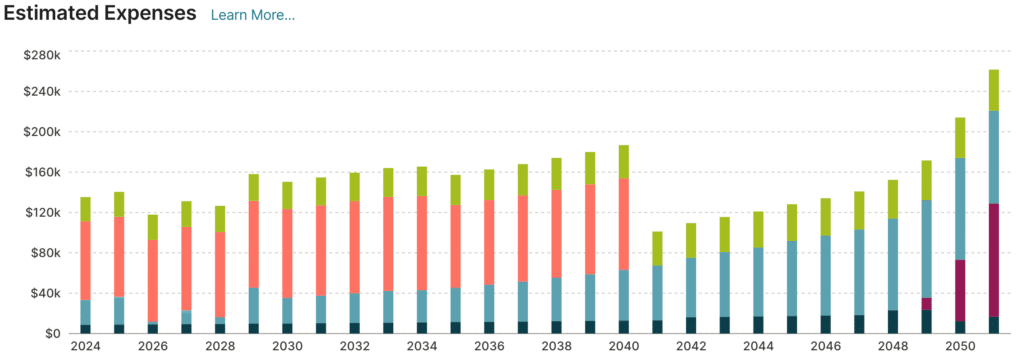
Next, you add your income: work, Social Security, pensions, annuities, and more. Then you add your spending. Boldin lets you split expenses into “Must Spend” and “Like to Spend,” which makes it easy to see whether your guaranteed income covers the essentials. With PlannerPlus, it also estimates your health care costs, including Medicare premiums, IRMAA surcharges, and long-term care.
3. See Where You Stand
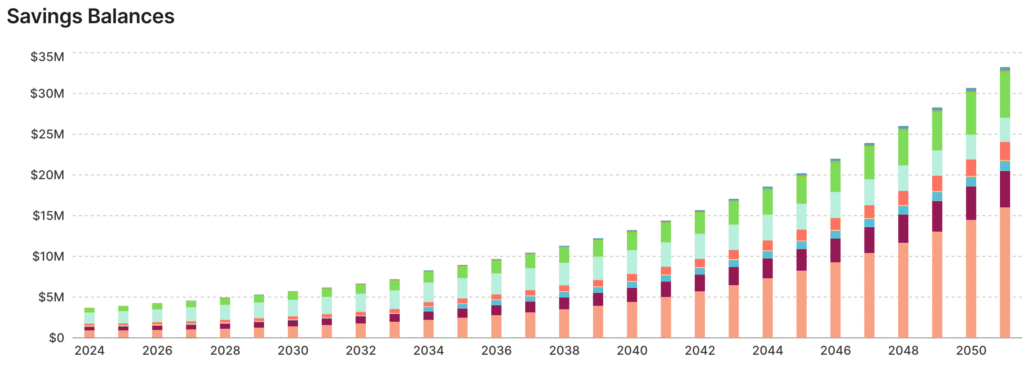
Once your numbers are in, Boldin shows how your savings change over time and where you have a gap or a surplus. With PlannerPlus, you also get your plan’s chance of success. You can view the plan with optimistic, average, or pessimistic assumptions, and a digital coach points out opportunities and possible errors as you go.
4. Explore “What If” Scenarios
This is the real value of a planner. What if you retire two years later? Claim Social Security at 70? Move to a state with no income tax? You can try each change and see what it does to your plan. With PlannerPlus, you can save up to 10 scenarios and compare three side by side.
Boldin’s Key Features
Boldin is packed with tools. Here are the ones that matter most.
A quick note on tiers: the features tagged (PlannerPlus) below require the paid plan.
Chance of Success (PlannerPlus)
Boldin runs your plan through 1,000 Monte Carlo simulations. Each one uses the average return you set for your accounts, plus random ups and downs based on how volatile those investments have been in the past. The share of simulations where your money lasts is your chance of success. If you want to know what that number really means, I wrote a full guide on decoding the chance of success in your retirement plan.
If I could change one thing about Boldin, it would be more detail on the Monte Carlo analysis. ProjectionLab goes further here, with historical backtesting alongside its Monte Carlo simulations.
Market Risk Explorer
A bad market early in retirement can do lasting damage. That’s sequence of returns risk, and the Market Risk Explorer lets you test for it. You can model a decade of 1% returns starting the year you retire, three straight years of losses starting at -15%, or a downturn you design yourself. Then you see what each one does to your plan.
Roth Conversion Explorer (PlannerPlus)
Roth conversions are one of the most common questions I get. Boldin’s Roth Conversion Explorer models four strategies: maximizing the value of your estate, minimizing your lifetime taxes, or converting up to a tax bracket or an IRMAA threshold you choose. You can compare the results before you decide. For more on why this matters, see my article on tax-efficient retirement withdrawal strategies.
Tax Projections (PlannerPlus)
PlannerPlus estimates your federal and state income taxes for every year of your plan. It uses current tax brackets and picks whichever deduction is better each year, standard or itemized. It also covers capital gains taxes, taxes on Social Security, and FICA. The free plan uses a flat 3% state tax rate instead.
Social Security Explorer
The Social Security Explorer helps you pick a claiming strategy for you and, if you’re married, your spouse. It accounts for spousal and survivor benefits in the most common situations. You can also model a future cut in benefits. Boldin’s default for that cut is 22%, based on the 2026 Social Security Trustees Report.
Spending Guardrails
Spending Guardrails answer a question every retiree asks: how much can I safely spend? Boldin sets a Safe Spending Target at an 80% chance of success, and every user gets it. If you’re retired, Boldin adds an upper guardrail at 95% and a lower guardrail at 70%. Rise above the upper one, and you can likely afford to spend more. Fall below the lower one, and it’s time to cut back for a while.
Withdrawal Strategies (PlannerPlus)
By default, Boldin withdraws only what you need to cover your spending and required minimum distributions. You can also test a fixed percentage withdrawal, like the 4% rule, or a maximum spending approach that spends down to your legacy goal. And you can set the order in which Boldin draws from your accounts.
Investments: Today and Future
Boldin added two investment features in September 2026.
Investments: Today
Investments: Today shows your asset allocation across all of your accounts. It even looks inside funds, like target date funds, and compares your mix to a target based on your risk profile. You can link your accounts, upload a statement, or enter your holdings by hand. I tested it in the video above, and I’m already using it in my own plan.
Investments: Future (PlannerPlus)
Investments: Future lets you forecast your plan with an allocation that shifts as you move toward and through retirement. You start with a short risk tolerance survey, and Boldin highlights the strategy that fits your risk profile and stage of life, out of five that range from conservative to aggressive. Then you can compare that path to a forecast that uses fixed historical rates of return. For now, it’s for exploring only. Boldin says the ability to apply a strategy to your plan is coming soon.
Boldin AI
Every Boldin user gets Boldin AI, an assistant that answers questions about your plan in plain English. Ask whether you can afford to retire two years early, and it runs the numbers using your actual plan. The math comes from Boldin’s planning engine, not the AI. Free users get a limited number of conversations, while PlannerPlus is unlimited. It’s still in beta, and as of August 2026 it can update your plan for you. PlannerPlus members can also connect their own AI assistant, like Claude or ChatGPT, to their plan through Boldin’s MCP server.
Help When You Want It
Boldin is a do-it-yourself tool, but you don’t have to go it alone. Everyone gets an intro course and planner demos. PlannerPlus adds 16+ in-depth classes and live planning Q&A sessions. There’s also a community of users, including a private Facebook group and user groups that meet to review each other’s plans.
If you want a professional, you can book one-on-one coaching to check your data and understand your results. Or you can hire Boldin Advisors, fee-only CFP professionals who charge a flat fee rather than a percentage of your assets. I haven’t used the coaching or the advisors myself, so I can’t speak to them from experience.
Boldin Pricing
Boldin has a free plan and one paid plan for individuals, plus optional help from a financial planner. Here’s how they break down.
| Plan | Price | What you get |
|---|---|---|
| Basic | Free | Build a plan, run what-if scenarios, and ask Boldin AI a limited number of questions. No Monte Carlo analysis, detailed tax projections, or withdrawal strategies. |
| PlannerPlus | $168/year, after a 14-day free trial | The full planner: Monte Carlo analysis, federal and state tax projections, the Roth Conversion Explorer, withdrawal strategies, account linking, unlimited Boldin AI, and live classes. |
| Boldin Advisors | $3,200 flat fee | A Retirement Plan Checkup with a fee-only CFP professional, including a written plan of action. Ongoing advice starts at $1,200 a year. |
What’s the Difference Between Basic and PlannerPlus?
The free Basic plan is a good way to kick the tires. But most of the tools that make Boldin worth using require PlannerPlus. Here’s the side-by-side.
| Feature | Basic (Free) | PlannerPlus |
|---|---|---|
| Plan inputs | 100+ | 250+ |
| What-if scenarios | Yes | Yes |
| Monte Carlo analysis | No | Yes |
| Tax insights | No | Yes |
| State income tax | Flat 3% rate | Your state’s actual brackets |
| Roth Conversion Explorer | No | Yes |
| Withdrawal strategies | No | Yes |
| Health care cost estimates | No | Yes |
| Real estate modeling | No | Yes |
| Detailed future budgeting | No | Yes |
| Real-time net worth analysis | No | Yes |
| Print reports or export data | No | Yes |
| Boldin AI | Limited | Unlimited |
| Personalized alerts | Up to 5 | Unlimited |
| In-depth classes and planning Q&As | No | Yes |
For most people, PlannerPlus is the plan that makes sense. It’s $168 a year, billed annually, and there’s no monthly option. The 14-day free trial includes every paid feature, so you can build your plan and see your results before you pay. You can cancel anytime.
Boldin vs Empower
Boldin and Empower both have retirement planners, so people often ask me which one to use. My answer depends on how far you are from retirement:
- More than about 5 to 10 years away: Empower’s free retirement planner is, frankly, the better choice.
- Closer to retirement, or already retired: I much prefer Boldin.
You can also use both at the same time. I’ve used Empower for years to track our investments and net worth. Boldin is where I do the planning.
| Empower | Boldin | |
|---|---|---|
| Cost | Free | Free Basic plan; PlannerPlus is $168/year |
| Best for | Savers more than about 5 to 10 years from retirement | People within about 5 to 10 years of retirement, or already retired |
| Retirement planner | Free, and it’s pretty good. It can estimate your savings and spending from your linked accounts. | More detailed, especially on taxes, Social Security, Roth conversions and withdrawals |
| Account linking | Yes, it’s built around linked accounts | Optional, with PlannerPlus |
| Net worth and investment tracking | Net worth, holdings, asset allocation, Fee Analyzer, and Investment Checkup | Net worth, plus the new Investments: Today, which shows your allocation across all of your accounts, even inside funds (new in 2026) |
| Monte Carlo | 5,000 simulations based on your actual asset allocation | 1,000 simulations based on the returns you set (PlannerPlus) |
| Taxes | Federal tax tables and a flat state tax rate | Federal and state brackets, standard or itemized deductions, and IRMAA (PlannerPlus) |
| Roth conversions | Not modeled | Roth Conversion Explorer (PlannerPlus) |
| Social Security | An estimate based on Social Security formulas, and you choose your claiming age | Social Security Explorer compares claiming strategies for you and your spouse |
| Health care | You enter it as a spending goal | Pre-Medicare costs, Medicare premiums, IRMAA, and long-term care (PlannerPlus) |
| How it makes money | Paid wealth management | Subscriptions and flat-fee advice |
When Empower Is the Better Choice
If you’re more than about 5 to 10 years from retirement, Empower is, frankly, the better choice for many. Its free Retirement Planner is solid. It runs 5,000 Monte Carlo simulations based on your actual asset allocation, and it can estimate your savings and spending from your linked accounts, so there’s less to enter by hand. At that stage, the big question is whether you’re saving enough, and Empower answers it for free. It also tracks your net worth, investments, and spending, and it shows you what you’re paying in investment fees.
When Boldin Is the Better Choice
Once you’re within about 5 to 10 years of retirement, I much prefer Boldin. That’s when the big decisions show up. When should you retire? When should you claim Social Security? Should you do Roth conversions, and how much? Which accounts should you draw from first? Answering those questions takes detailed tax modeling, and that’s where Boldin shines.
Why Not Use Both?
Moving your planning to Boldin doesn’t mean giving up Empower. It’s free, and it’s still a great way to track your net worth and asset allocation. That said, Boldin has taken a big step forward here with its new Investments: Today tool, which shows your allocation across all of your accounts, even inside funds. Just know that Empower offers its tools for free because it hopes you’ll hire its wealth management service. You don’t have to, and you can use the dashboard without ever investing with Empower. For more, read my full Empower review.
Boldin vs ProjectionLab
ProjectionLab is Boldin’s closest competitor, and I’ve used both for years. ProjectionLab is the one I recommend most often for detailed tax planning and Monte Carlo simulations. It also offers historical backtesting and supports planning in several countries outside the US.
Boldin is what I use for my own plan, largely because it’s so easy to use. It also offers account linking, which ProjectionLab doesn’t, and more ways to get help, from live classes to flat-fee advisors. Its AI chat feature is also excellent, something ProjectionLab doesn’t offer yet. ProjectionLab costs a bit less: Premium is $129 a year, and Boldin PlannerPlus is $168. For the full picture, read my ProjectionLab review.
Other Boldin Alternatives
- Pralana: A highly detailed planner. Pralana Bronze is free and runs in Excel. The paid versions, Pralana Gold (Excel) and Pralana Online (web), calculate federal and state taxes in detail and compare three scenarios side by side. I compared the chance of success results from Boldin, Pralana, and ProjectionLab in this video.
- MaxiFi: Built on an economic idea called consumption smoothing. Instead of asking how much you want to spend, it tells you how much you can spend each year. I find it harder to use than Boldin, but some people love it.
- Free retirement calculators: If Boldin is more than you need, my list of the best retirement calculators covers simpler free options.
Pros and Cons
Pros
- Easy to use for how much it does. That’s what I like most about it.
- Handles the big retirement decisions: taxes, Social Security, Roth conversions, withdrawals, and health care.
- A free plan to start, plus a 14-day free trial of PlannerPlus.
- Account linking keeps your balances current (PlannerPlus).
- Plenty of help when you want it: classes, live Q&As, user groups, coaching, and flat-fee CFP professionals.
- Constantly improving. In 2026 alone, it added investment tracking, a document vault, and an AI assistant that can update your plan.
- No commissions or product sales, and it doesn’t sell your data.
Cons
- The Monte Carlo analysis could use more detail, and there’s no historical backtesting.
- Most of the best features require PlannerPlus. The free plan has no Monte Carlo analysis and uses a flat 3% state tax rate.
- It’s billed annually. There’s no monthly plan.
- There’s no mobile app. It runs in your web browser.
- It’s built for U.S. taxpayers only.
- Like any detailed planner, it’s only as good as what you put in, and a thorough plan takes time to build.
Frequently Asked Questions
Is Boldin free?
Yes, Boldin has a free Basic plan, and you don’t need a credit card to sign up. It lets you build a plan and try what-if scenarios. But it leaves out Monte Carlo analysis, detailed tax projections, and the Roth Conversion Explorer. For those, you need PlannerPlus, which costs $168 a year after a 14-day free trial.
How much does Boldin cost?
PlannerPlus costs $168 a year, which works out to $14 a month, billed annually. There’s no monthly plan. If you want help from a financial planner, Boldin Advisors charges a flat $3,200 for a Retirement Plan Checkup, and ongoing advice starts at $1,200 a year.
Is Boldin the same as NewRetirement?
Yes. NewRetirement changed its name to Boldin. It’s the same company, and its legal name is still NewRetirement, Inc., doing business as Boldin.
Does Boldin have a free retirement calculator?
Yes. The free Basic plan works as a detailed retirement calculator. Boldin’s website also has free standalone calculators, including a simple retirement calculator, a Roth conversion calculator, and a lifetime annuity calculator. For more free options, see my list of the best retirement calculators.
Is Boldin safe?
Boldin follows SOC 2 security controls, and its most recent SOC 2 Type 2 audit period ended in September 2025. It uses 256-bit encryption and offers multi-factor authentication. It doesn’t require your Social Security number, your real name, or your account numbers. If you link accounts, Boldin connects through Plaid, MX, or Finicity, and it never stores your bank login. It also doesn’t sell your data.
Should I use Boldin or Empower?
It depends on how close you are to retirement. If you’re more than about 5 to 10 years away, Empower’s free retirement planner is a solid choice. Once you’re closer, I prefer Boldin for its detailed planning on taxes, Social Security, and withdrawals. You can also use both, with Boldin for planning and Empower for tracking your net worth and asset allocation. See Boldin vs Empower above for the full comparison.
Does Boldin have a mobile app?
No. Boldin runs in your web browser. It works in the browser on your phone or tablet, but there’s no app to download.
Can I use Boldin outside the US?
You can, but it isn’t built for it. Boldin follows US tax law, including the rules for Social Security and required minimum distributions, and it doesn’t handle other countries’ tax rules or retirement accounts. If you’re planning outside the US, ProjectionLab supports several other countries.
Is Boldin worth it?
For me, yes. I’ve used it for six years, and I pay for PlannerPlus. If you’re getting close to retirement, $168 a year is a small price for help with decisions like when to retire, when to claim Social Security, and whether to do Roth conversions. Getting those right can be worth far more than $168. Start with the free plan, and if you like it, try PlannerPlus free for 14 days.
Final Verdict
I’ve used Boldin for six years, and it’s still the tool I use for my own retirement plan. It’s easy to use for how much it does, and it handles the decisions that matter most in retirement: taxes, Social Security, Roth conversions, withdrawals, and health care costs.
It’s not perfect. I’d like more detail on the Monte Carlo analysis, and if detailed tax planning is your top priority, ProjectionLab deserves a look. But for most people planning their own retirement, Boldin is an excellent choice. Start with the free version. If it clicks, the 14-day free trial of PlannerPlus lets you try everything before you pay.
