
5 Best Family Budget Apps to Manage Household Finances
We earn a commission from the offers on this page, which influences which offers are displayed and how and where the offers appear. Learn more here.
By Rob Berger, JD | April 15, 2026
Running a household budget is a team sport. Between groceries, activities, school costs, family vacations, and the never-ending parade of streaming subscriptions, families today are juggling more financial pieces than ever. Add in allowances, kid-related spending, and often two incomes flowing in from different directions, and it’s easy to lose track of where the money is actually going.
The right budgeting app can bring order to all of it — a single dashboard for household income, shared categories for kid expenses and groceries, and the ability to plan ahead for the school year, summer camp, and the holidays. Let’s dive into the five best family budget apps for managing household finances.
Editor’s Pick
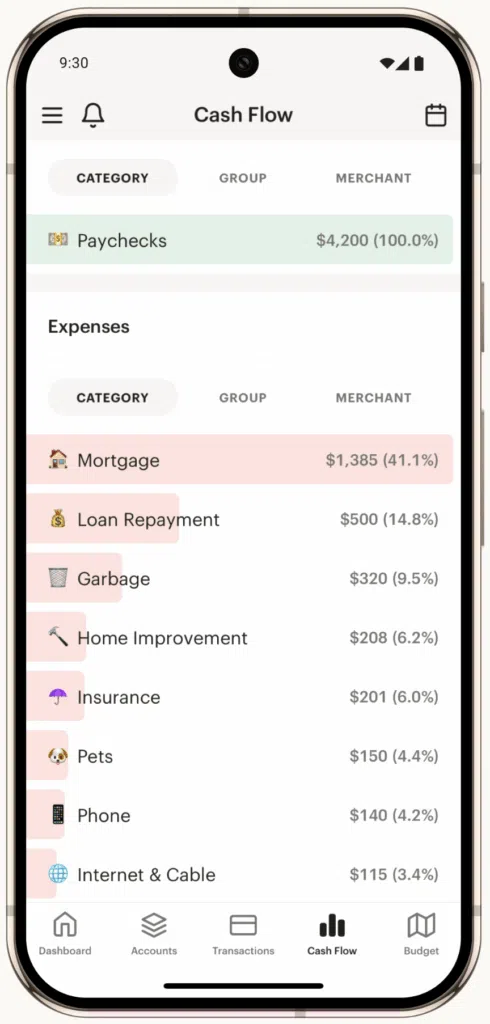
Monarch Money is the budgeting app my wife and I use to run our household finances. It earns its spot as editor’s pick because it’s built for multi-member households. You can add your spouse, and even adult kids, link both joint and individual accounts, assign separate logins, and see a comprehensive view of the family’s finances in one place. Family members can tag each other on transactions, set shared savings goals for things like vacations or college, and track progress together.
Monarch Money also offers customizable budgeting tools and detailed reports that make it easy to see where household money is actually going — groceries, activities, school expenses, and everything in between. Its user-friendly interface and custom categories make it an excellent choice for families aiming to manage household finances together.
NEW: Monarch has just released its Filter by Owner feature. It enables you to designate accounts and transactions as “owned” by you, your spouse, or the household. You can then use a drop-down to select whose accounts/transactions to view — useful when you want to isolate a single family member’s spending without losing the household view.
App Store Rating: 4.9 (80k reviews)
Platforms: Apple iOS, Android or Web
Best for families managing joint and individual accounts who want a shared household view with per-member visibility.
Limited Time Offer: Get 50% off of Monarch Money the first year with the code ROB50.
Personal Finance Apps for Families
1. Monarch Money
Monarch Money offers collaborative financial planning tools purpose-built for multi-member households. These features include the following:
- Multi-Member Access: You, your spouse, and even adult kids can each have their own login with two-factor authentication.
- Household Dashboard: A single dashboard brings together every account, budget and goal in the household — plus a full household net-worth view.
- Accounts: Connect joint accounts alongside each family member’s individual accounts
- Transaction Review: Tag your spouse on specific transactions that need reviewed — great for figuring out “who bought the $87 of Legos?”
- Goals & Custom Categories: Create shared savings goals (family vacations, college, a new car) and custom categories for kid-related expenses like activities, allowances, and school costs
The app provides customizable dashboards and reports that show where your money is going to help you figure out where to cut back spending if needed.
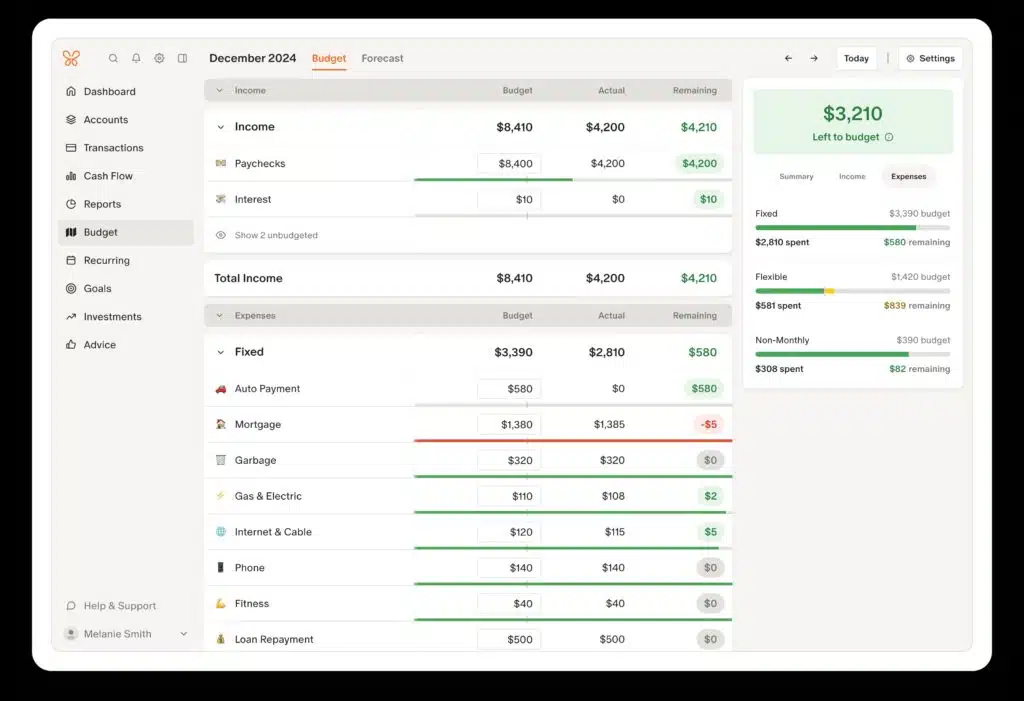
One of the stand out features of this app is it offers two ways to budget. You can choose Flex Budgeting which tracks your Fixed, Flexible, and Non-Monthly spending — often a better fit for families whose expenses swing month to month. Or you can choose Category Budgeting and assign a fixed amount to each spending category, which works well if you want tight control over variable costs like groceries and kids’ activities.
Another excellent feature is the ability to tag family members on transactions to have them review a charge or to identify who made the charge. It also supports manual and automated data entry. Monarch offers a one-week free trial.
Cost: The cost is $14.99/month, or discounted annually for $99.99 ($8.33/month). For a limited time, it is offering a 50% discount off the first year. Just use the Discount Code: ROB50.
Best for: Families who want a sophisticated tool to manage and budget household finances together in a visually appealing, customizable platform.
2. Origin
The Origin app offers several features to help families manage whole-household finances together. These include:
Limited-time intro offer: Origin is currently offering the first year of its annual subscription for just $1 — an easy way to test-drive whole-family financial planning without a real commitment.
- Separate Logins: A user can invite their spouse from within the Profile section of the app. I added my wife and it took just a few seconds.
- Separate & Joint Accounts: Accounts can be marked as separate or joint. Each spouse can toggle between views of joint accounts or their individual accounts — useful when one income supports the household and the other covers specific family expenses.
- Shared Budgets: Families can create shared budgets and track household spending together.
- Shared Financial Dashboard: Budgets, goals, net worth and other financial data is available in a single, shared dashboard.
- Account Toggle: Easily toggle between viewing all household accounts, just your accounts, or just your spouse’s accounts.
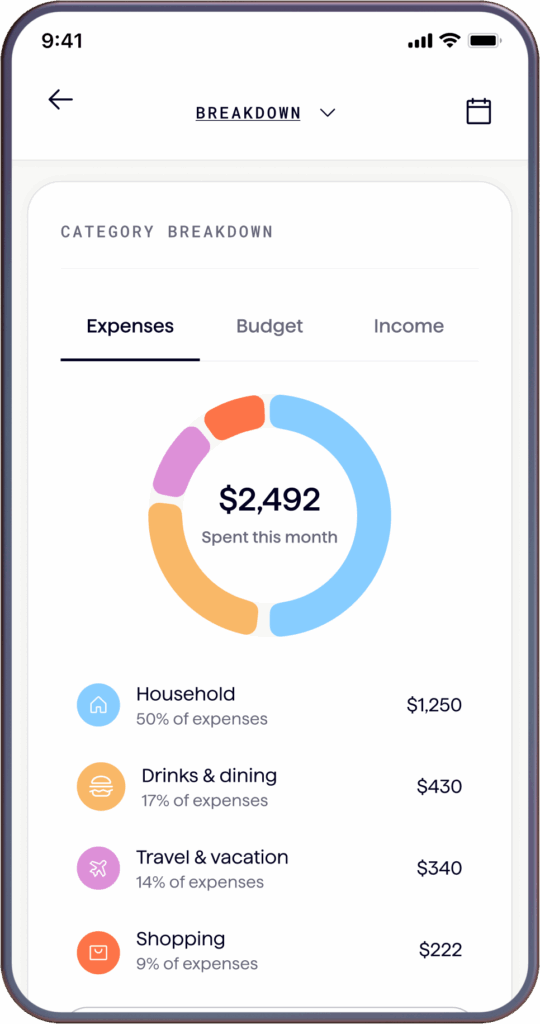
Origin is unique among all of the budgeting apps I’ve ever tried (including all of the apps on this page). For starters, it does a lot more than just budgeting — which makes it especially appealing for families juggling bigger financial decisions. For example, with Origin you can:
- Track your investments
- Invest with index funds
- Save cash with a competitive APY
- Do your taxes
- Create a will
- Create a trust
- Talk to a Certified Financial Planner
- Track shares, RSUs, ISOs, and NSOs
- Understand potential tax implications
- Simulate exercising stock options
Most of these features come with the monthly or yearly subscription fee. For example, Origin includes tax software that comes with your subscription. The estate planning tools — wills and trusts — are a particularly big deal for families. If you’ve been putting off drafting a will “someday,” having it bundled with your budgeting app removes a lot of friction. Features that require additional fees, such as creating a trust or talking with a CFP, are reasonably priced in my view.
Beyond these features, Origin has also integrated AI into its app. You can use AI to ask questions about your budget — handy when you’re trying to figure out whether the family really can afford to upgrade the minivan. It’s one of the most advanced and feature-rich money apps I’ve ever used.
Origin offers a 7-day free trial, after which the cost is either $12.99 a month or $99 a year ($8.25 a month). Right now, the first year of the annual plan is just $1 — then $99/year after that.
3. Quicken Simplifi
Quicken Simplifi is a modern budgeting and financial tracking app that emphasizes ease of use, real-time alerts, and AI technology. It’s easy enough that a non-financial spouse can actually keep up with it, which matters a lot for family adoption. Key features:
- Shared Spaces: A user can invite a spouse to join the app for no additional cost. Quicken Simplifi calls this “Spaces & Sharing.”
- Separate Logins: Each user gets their login credentials.
- Shared Dashboard: Both spouses have full access to Quicken Simplifi’s dashboard, which brings together in one place a high-level view of household money.
- Joint and Individual Accounts: Link joint household accounts alongside each spouse’s individual accounts.
- Shared Budget & Watchlists: Both spouses have full access to the shared household budget and expense tracking, plus watchlists for categories that tend to creep on families — groceries, dining out, and discretionary spending.

There’s no dedicated family mode, but the “spaces & sharing” option covers a spouse, and the Planned Spending feature is a standout for families — you can map out the cost of the school year, summer activities, or the holidays ahead of time instead of getting hit with them all at once. You can also track your investment balance and performance in the app. There’s no free plan but it is one of the more affordable options.
Cost: Regularly $5.99/month, but currently available the first year for $2.99/month, billed annually.
Best for: Families seeking a simple, affordable, intuitive budget app that a non-financial spouse can actually keep up with.
4. Rocket Money
I started using Rocket Money for both our personal and business budgets two years ago. While I switched to Monarch Money, I still think Rocket Money is an excellent option — especially for families drowning in subscriptions (and what family isn’t?). Between each kid’s streaming service, gaming subscription, and that gym membership your spouse forgot about, subscription audit is practically a part-time job. Rocket Money makes it painless. On top of that, you can get the premium version for as little as $7 a month.
Features that matter for households include the following:
- Separate Logins: Separate logins for each spouse, each with two-factor authentication
- Shared Household Budget: Jointly create and adjust family budgets
- Dashboard: One unified dashboard for individual and joint accounts
- Notes: Add notes to transactions visible to the whole household
As for budgeting, Rocket Money does the basics well. It’s easy to track your spending and set up budgets. It’s easy to create rules for automatically categorizing transactions. And it’s easy to connect your investment accounts if you want to.
Here’s what the dashboard looks like for my business (it looks the same for personal expenses):
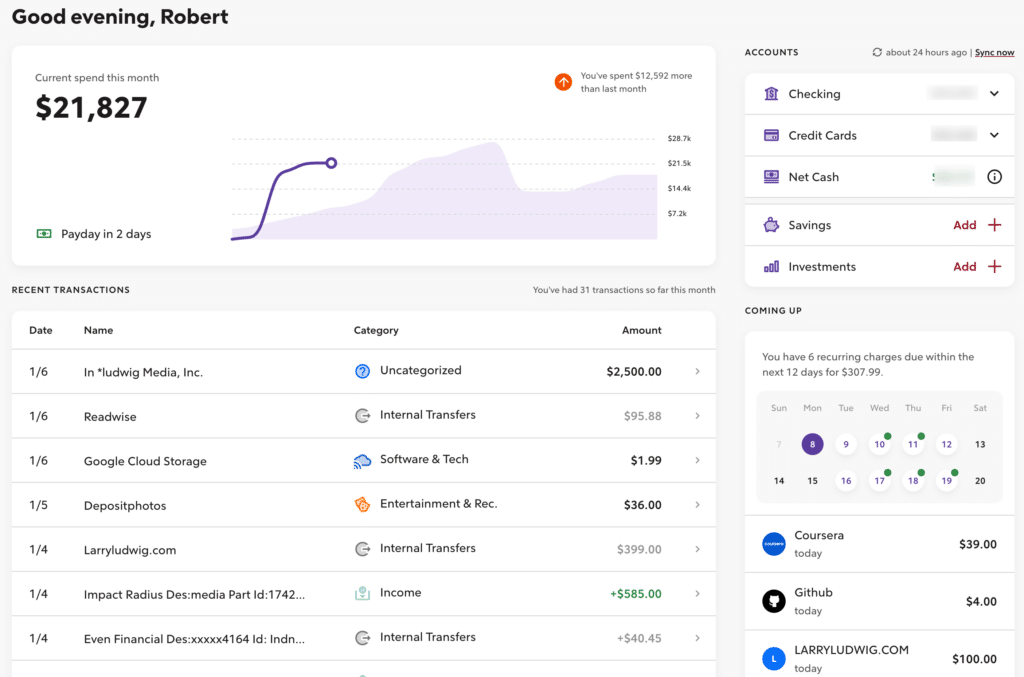
It gives me a snapshot of everything I need to manage family money. Rocket Money keeps track of subscriptions across the whole household and makes it easy to cancel the ones nobody remembers signing up for. Bill negotiation is another family-friendly win — it can chip away at phone, internet, and cable bills that add up fast. It’s an excellent Mint replacement, particularly if you focus on budgeting.
Key Features
- Subscription management
- Calendar budget
- Bill negotiation
- Net worth tracking
- Credit score monitoring
- Investment tracking
- Spending goals
- Budgeting
Rocket Money offers a free and paid version. The paid version costs $7 to $14/mo based on what you choose to pay them. Seriously.
5. YNAB (You Need a Budget)
YNAB is a premium budgeting app based on a method to give every dollar a job, similar to envelope budgeting. That zero-based approach works exceptionally well when you’re feeding a family on a fixed budget — every dollar is assigned before the month starts, so there’s no guessing whether there’s enough for groceries and the kids’ soccer registration. YNAB syncs with bank accounts and allows real-time budget sharing across the household. And if you bring older kids into the process, it’s one of the best tools out there for teaching them real financial discipline.

YNAB offers manual and automatic transaction importing. I find it helpful to manually add transactions to YNAB as I make them, then I make sure they match the credit card transactions that automatically import. This is especially helpful in a family — when a credit card purchase comes through a week later, neither you nor your spouse can remember which kid’s activity it was for.
YNAB is not as focused on investment tracking or bill payment reminders, so you’ll need to keep track of that on your own. While there’s no free version, there is a 34-day trial.
Cost: $14.99/month or $109/year ($9.08 per month).
Best for: Families dedicated to mastering a zero-based household budget and gaining total control over spending.
Summary of Top Budget Apps for Families
| App | Price | Best For | Strengths | Limitations |
|---|---|---|---|---|
| Monarch Money | $14.99/month or $99.99/year–Get 50% off first year with promo code ROB50 | Tech-savvy families wanting multi-member access and a collaborative household dashboard | Customizable dashboards, investment tracking, joint financial planning | No free version, learning curve for beginners |
| Origin | $1 first year (intro offer), then $99/year–or $12.99/month | Families wanting all-in-one planning, including wills & trusts | All-in-one family planning (wills, trusts, CFP access), best AI integration | No free version |
| Rocket Money | Free, $7 – $14/month | Families drowning in subscriptions and recurring household bills | Free version, excellent mobile app and budgeting features | Cancellation services don’t always work |
| YNAB | $14.99/month or $109/year | Families serious about zero-based budgeting and teaching kids financial discipline | Powerful budgeting philosophy, educational resources | Steep learning curve, no investment features |
| Quicken Simplifi | $5.99/month (billed annually) | Families wanting an easy, affordable app a non-financial spouse can actually use | Real-time syncing, modern UI, customized plans | Only one shared spouse account, basic investment tracking |
Final Thoughts
For families trying to bring order to household finances — tracking groceries, allowances, activities, subscriptions, and savings goals all in one place — there’s an app on this list for you. If you’re committed to running a real household budget with full visibility across the family, Monarch Money is my top pick and worth the cost (especially with the 50% first-year discount using code ROB50). If your family is new to budgeting, start with Rocket Money’s free tier to get a snapshot of household spending and subscription bleed, then graduate to Monarch or YNAB when you’re ready to level up. And if Origin’s whole-family planning tools (including wills, trusts, and CFP access) sound like a fit, the current $1 first-year promo makes it nearly risk-free to try.
