
Simplifi Review: A Beginner-Friendly Budgeting App Worth Trying
We earn a commission from the offers on this page, which influences which offers are displayed and how and where the offers appear. Learn more here.
By Rob Berger, JD | Last Updated March 11, 2026
Simplifi is a cloud-based mobile app built by the team behind Quicken. Simplifi, as the name suggests, is a simplified version of Quicken. Its purpose is to simplify your financial clutter and give you a clear picture of your cash flow, savings, and overall financial health. It’s beginner-friendly, showing you where your money goes, and how much you have left to spend or save.
I signed up for Simplifi to test the features for this review and to help you decide whether it’s the right fit for your financial life. Below, we break down Simplifi’s core features, where it excels, where it falls short, and how it stacks up against alternatives like Monarch Money, YNAB, and Rocket Money. Here’s our full Simplifi review.
Quick Take
Simplifi is a personal finance app created by Quicken to make budgeting simple for all users, especially beginners. It connects to over 14,000 banks, credit cards, and financial institutions. Simplifi’s dashboard gives users a clear view of spending, income, bills, goals, and net worth in one place. Simplifi’s standout features include customizable Watchlists to track overspending, goal tracking with progress badges, with a clean look that makes money management easy for beginners.

What Is Simplifi?
Simplifi is a personal finance app that tracks your spending, income, bills, and investments. Simplifi is available on both iPhone and Android devices, as well as on your desktop. Its budgeting approach takes your income minus your recurring bills to come up with a spending plan; i.e. anything left over is available to spend, save, invest or whatever you want to do with it.
Getting Started with Simplifi
Getting started is easy. I signed up for the year, and connected my accounts seamlessly. After connecting my bank, I did encounter one issue. My bank has a round-up feature when you spend. For example, a $14.80 purchase rounds up to $15 and the $0.20 round up goes in a savings vault. Simplifi initially chose to categorize all of the round ups as income, which doesn’t make sense. Other than that hiccup, getting started went smoothly.
The dashboard is clear and easy to use. You’ll see recent transactions, upcoming bills, and your net worth.

Simplifi’s Core Features
Dashboard & Overview
The Simplifi dashboard is also easy on the eyes, with everything nicely laid out. There’s a history of all of your recent transactions, what your planned spend is (upcoming and recurring bills) and a pie chart of how much you spent on what.
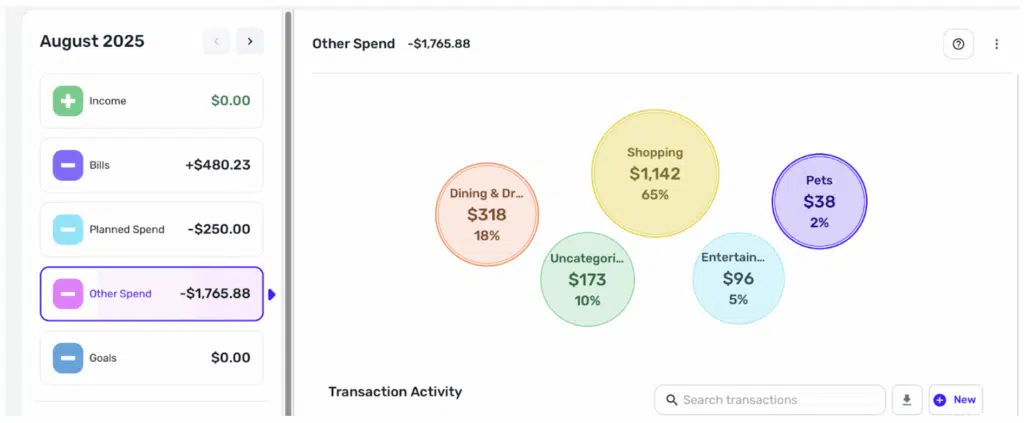
If you scroll down a bit, you’ll get a snapshot of your emergency fund, your Watch List, and your recent spending. If you click on any of the boxes, you’ll get a more comprehensive view of that category.

Budgeting & Cash Flow Insights
Simplifi’s budgeting is straightforward. It takes your income and subtracts recurring bills. What’s left is what you can spend or save however you choose. It automatically categorizes expenses for you, but if it gets it wrong you can manually recategorize them.
You can also set up rules for transactions by going to Settings (on the left side of the dashboard). You’ll select a keyword and this will enable Simplifi to automatically categorize the transactions with that keyword into the category you choose. For example, if you always do your grocery shopping at Walmart, you can make “Walmart” the keyword and it will automatically put those transactions in the “grocery” category.
I found the Watch List feature incredibly helpful. It tracks your spending in a certain category, payee or tag. Take restaurant spending as an example. If I think I’m spending too much on takeout, I can have Simplifi closely monitor this category. Simplifi will keep a running tally, telling me how much I’ve spent so far this month and how much I have left.
Goal Setting & Net Worth Tracking
Savings Goals is a tab on the left side of the dashboard. You can choose from six categories: Emergency Fund, Car, Vacation, Home, Wedding or Custom. Simplifi then keeps track of the money in your linked savings account and alerts you with a badge when you reach your goal.
Simplifi shows your net worth at the top of the dashboard. It takes your assets and subtracts your liabilities. Assets can include real estate; you enter your address and Zillow will calculate how much your home is worth. However, you’ll have to enter how much left you have on the mortgage by linking the bank. For things like fine art or your stamp collection, you can enter those manually.
Transaction Management & Tagging
There’s a lot of flexibility in Simplifi when it comes to transaction management. You can create a tag for certain expenses that fall into the same category but are not the same, such as everything you spend on vacation. Create a tag for “vacation” and you can see how much the vacation cost, as well as how much you spent in subcategories including gas, restaurants, entertainment, etc. You can also do this with business expenses vs. personal expenses, but if you do that often, you should probably consider Quicken Classic.
You can also split a transaction. Click on the transaction, then on the three dots on the right. “Edit transaction” will be at the top. From there, you can add notes, attach receipts, split the transaction or track a refund.
Spending & Income Reports
Reports is at the bottom on the left side of your dashboard. There are reports for:
- Spending
- Income
- Savings
- Net worth
- Monthly summary
- Taxes
You can create custom reports for spending and income by category, payee, tag, or none. You can also choose what time frame you want, such as month to date, quarter to date, last month, last year, or custom. Custom allows you to choose whatever date range you want.
You can select filters and see how much you spend on various categories. For example, if I want to know how much I spent on dining for the month of October 2024, I click that category and select that date range. While this only works if you use Simplifi on the dates in question, it’s still a handy tool to keep spending in check.
Alerts & Notifications
You can get alerts about upcoming bills, income, if you’ve met a goal or earned a badge. It can also tell you if you haven’t contributed to your savings goals this month, which might guilt you into staying on track. The only weird thing I found was that sometimes it thinks a one-time charge is a recurring bill, so you’ll have to go in and fix that manually.
Investment Tracking
Simplifi can track the value of your portfolio over time. It can tell you today’s balance, gain or loss, and any transactions you’ve made. It’s pretty basic so if you want more sophisticated investment analysis, you’ll need Quicken Classic or an investment tracking app.
Read More: 8 Best Investment Tracking Apps
Simplifi Security & Privacy
Quicken has over 40 years experience dealing with sensitive data and uses the same standards for Simplifi. Simplifi uses 256-bit bank level encryption to securely transmit your data from your financial accounts. Simplifi earns its money from subscriptions, not from mining or selling your data. Still, to prevent hacking, you want to use strong passwords and enable mutli-factor authentication to protect your accounts.
Simplifi Pricing
Simplifi is currently $2.99 a month for the first year (regularly $5.99/month), billed annually. There is no free trial or free tier, but you can cancel within 30 days and get your money back if you decide it’s not for you. I tested this, and the money back guarantee is genuine. I didn’t have any difficulty getting my money back.
Also, for $2.99/month or even for the regular price of $5.99/month, Simplifi is one of the most affordable personal finance apps available.
Simplifi vs. Alternatives
Simplifi vs. Monarch Money
Simplifi makes it easy to set up a budget and get an overview of your financial life. There are notifications for upcoming bills, when you’ll get paid, and the Watch List is handy. Users who have never used a budgeting app before will love Simplifi’s intuitive interface.
Monarch Money is comprehensive and offers many more features including investment analysis. It’s arguably prettier than Simplifi, as well as highly customizable. It’s also more expensive, so if you don’t need the extra features, Simplifi might be enough for you. Monarch offers a free trial, though, so you can try it before you buy, which is nice. You can also get 50% of the first year’s subscription with promo code ROB50.
Simplifi vs. YNAB
If all you really want is a budgeting app, YNAB (You Need a Budget) may be perfect for you. YNAB gives every dollar a job, also known as zero-based budgeting. Assigning a job for every single dollar when you get paid helps you avoid impulse spending. But YNAB does require commitment to set up. It takes time to learn how to use it and it’s pricer at $14.99/month or $109/year.
Simplifi is way easier to get started with and requires less work to manage. Also, YNAB is slow to roll out new features or updates. It does come with one of the longest free trials out there, though: 34 days, which is plenty of time to decide if it’s for you.
Simplifi vs. Rocket Money
Rocket Money will find all your subscriptions for you, and if you go with the Premium version, it can even cancel them for you. With the Premium Plan, it can negotiate bills on your behalf as well, but be aware that there is a fee for this. Rocket Money is free to use but the Premium Plan does cost $6 to $12 per month. Simplifi will not negotiate bills or cancel subscriptions for you, but it does provide a simple way of keeping track of your money.
Simplifi Pros and Cons
Frequently Asked Questions
What is the difference between Quicken and Simplifi?
Quicken Classic is more comprehensive and is a mostly desktop application. Simplifi is cloud-based (so you can access it from pretty much anywhere). Quicken offers a category based budgeting system, whereas Simplifi creates a budget based on recurring bills and income. Quicken has robust tax preparation and bill pay features; Simplifi has neither. They are two entirely different platforms: you can’t share information between the two.
Is Simplifi free to use?
No–and there is no free trial, either. There is a money-back guarantee, but there is no monthly subscription: you’ll have to pay upfront for a year, and if you don’t like it, you can request your money back within 30 days of signing up.
Does Simplifi sync with all bank accounts?
It syncs with over 14,000 financial institutions, but it doesn’t sync with every single one. If your bank happens to not be one of those, you can add it manually but you won’t see any transactions; you’ll have to add them.
Does Simplifi offer investment tracking?
It offers basic investment tracking: you can see your holdings, market value, and if your portfolio is up or down. You can track the value over time. It does not offer insights or optimization advice, track dividends, or anything like that.
Who Should Use Simplifi?
Simplifi is best for:
- Beginners looking for their first financial tracking and budgeting app
- Couples who want to share a subscription and track finances together
- People who want an easy, “set it and forget it” spending plan
- Anyone who finds Quicken Classic or YNAB too overwhelming
Simplifi is not ideal for:
- Investors looking for detailed analysis
- DIY tax preparers who want integrated tools
- People focused heavily on debt repayment strategies
Final Thoughts
If your goal is to start tracking your money without the hassle, Simplifi is absolutely worth a try. It’s easy to use, affordable, and packed with valuable features.
That said, it’s not built for advanced users. If you need in-depth investment analysis, or debt payoff tools, check out our list of alternatives above. But for beginners, or anyone who wants a clean, straightforward way to stay on top of spending, Simplifi is a winner. With a 30-day money-back guarantee that works, it’s a low-risk way to see if simplifying your finances is exactly what you’ve been missing.
