The Best Personal Finance Software Apps (2026)
We earn a commission from the offers on this page, which influences which offers are displayed and how and where the offers appear. Learn more here.
By Rob Berger, JD | Last Updated: September 4, 2026
My team and I have used and tested over 20 personal finance software apps. I’ve personally used and tested every app on this page. The first app, Monarch, is the one my wife and I use today for budgeting, and I use Empower and Kubera for investment and net worth tracking. But all of the apps listed here are excellent.
Quick Answer
Top 7 Personal Finance Software Apps
1. Monarch Money: Best Overall
Monarch Money is like your financial control center. It’s an all-in-one platform for budgeting, investment tracking, goal setting, and long-term financial planning.
Monarch has a slick interface that creates colorful charts for all of your financial information. It offers flexible budgeting, smart investment tracking, and net worth updates. You can create custom categories and set goals, even easily categorize your Amazon purchases. Flexible budgeting also accounts for those expenses that aren’t monthly but still recurring, such as seasonal expenses or quarterly tax payments.

It links to over 13,000 financial institutions so odds are it can link with yours.
Monarch Money Key Features
- Customizable dashboards and reports
- Investment tracking with real-time updates
- Goal-setting tools for short- and long-term financial goals
- Credit Score Tracking Included
- Seamless syncing with banks and investment accounts
- Great for couples: you and your partner can log into the same account and see all of your combined and individual accounts
Why It’s Great: Monarch’s intuitive design and powerful features make it ideal for both budgeting and comprehensive financial management.
Cost: 7-day free trial, then $8.33/month billed annually. Get 50% off the first year ($4.17/month billed annually) of Monarch Money Core Plan with Promo Code ROB50.
Read my Monarch Money Review
On Monarch’s Website2. Quicken Simplifi: Best Value
Quicken Simplifi is a cloud-based personal finance app built by the team behind Quicken. As the name suggests, it strips away the complexity of traditional Quicken to give beginners a clean, intuitive way to track spending, set goals, and understand cash flow at a glance.
Quicken Simplifi connects to over 14,000 banks, credit cards, and financial institutions, automatically categorizing transactions and showing you a daily snapshot of where your money goes. Its standout feature is the customizable Watch List, which lets you keep a running tally on any category, payee, or tag you tend to overspend on. Couples can share a single subscription — a nice touch for households who want one tool for both partners.
Quicken Simplifi offers a 7-day free trial, then $6.99/month billed annually. Get 50% off the first year ($3.49/month billed annually).
Quicken Simplifi Key Features
- Customizable Watch Lists for any category, payee, or tag
- Savings goals with progress badges
- Built-in net worth tracking
- Couples can share a single subscription
- Track Investments
- Excellent Dashboard
Why It’s Great: Quicken Simplifi is the easiest on-ramp to budgeting — affordable, clean, and beginner-friendly, with just enough features to actually stick with.
3. Empower: Best for Tracking Investments
Empower outshines others with its powerful investment tracking and retirement planning features. Empower can budget, track net worth, and track bills, but what it does best is track investments.
Once you connect all of your accounts, it automatically updates everything throughout the trading day, so you have an up-to-the-minute view of your bottom line. It can also compare your portfolio to the S&P and analyze your asset allocation.

The retirement planning features are top-notch, and did we mention Empower is free to use? You can play with multiple scenarios, including when you retire, how long you live, how much you spend, and then compare the outcomes. Empower also gives you a score to indicate your retirement readiness.
Empower Key Features
- Tracks investments across multiple platforms
- Provides retirement planning tools, including projections and suggestions for improving retirement savings
- Connects directly to your bank and credit card accounts for seamless synching
- Wealth management services available for users with at least $100,000 to invest.
Why It’s Great: Empower is excellent for users who want a holistic view of their financial situation, with a special focus on retirement.
4. Rocket Money: Best for Bill Negotiation
Rocket Money helps users manage their subscriptions, track spending, and cut expenses. There’s a free version or a Premium subscription.
Rocket Money can help you build a budget, track your spending, and even cancel unwanted subscriptions for you. If you pay for the premium version, Rocket Money can also negotiate bills on your behalf.
The Premium subscription costs between $7 and $14 per month. You get to choose the price within that range depending on what you think the service is worth.
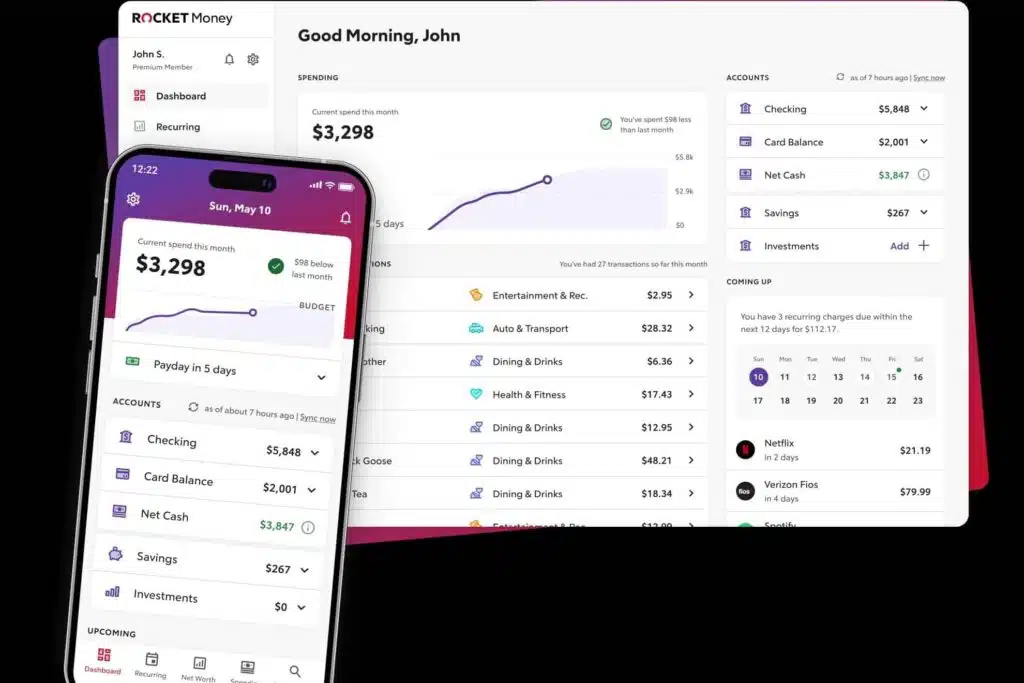
Rocket Money is great for beginners or anyone overwhelmed with managing expenses. Rocket Money will even send you an alert if it looks like there isn’t enough money in your checking account to cover an upcoming bill.
Rocket Money Key Features
- Subscription management, allowing users to cancel unwanted services with a click
- Budgeting tools to track daily expenses
- Track your credit score within the app
- Bill negotiation service
Why It’s Great: It’s perfect for users looking to optimize their spending and manage recurring expenses.
Read our Rocket Money Review
5. Origin: Most Comprehensive App
A newer player in the personal finance software space, Origin offers a sort of one-stop-shop for financial features. It can do what most financial apps do, such as budgeting, spend tracking and insights, and calculate net worth. But then Origin tosses in some features that most apps don’t have, such as tax filing, estate planning and the option to park your money in a high-yield savings account.
One feature for investors is pretty cool: you can invest in themed stock bundles like “Clean Energy,” “Buffet’s Picks,” or “Mid-cap Movers.” Each bundle is made up of 8-20 stocks and it makes it simple to get into investing.

Some of these services are included with your subscription fee of $12.99 a month ($99 if billed annually) and some incur an additional fee. For example, setting up a basic will is included, while setting up a trust is $359 for members.
Origin Key Features
- Portfolio tracking for stocks, bonds, and retirement accounts
- Retirement goal planning with projections and optimization tools
- Interactive and visual financial planning tools
- Invest in stock bundles that align with your interests
- High-yield savings account
- Estate planning
- Tax filing
Why It’s Great: Origin combines everyday money management with advanced features like tax filing, estate planning, and investing. It’s a true all-in-one platform for building wealth.
Limited Time Offer: Get your first year subscription for just $1.
6. Kubera: Best for Comprehensive Net Worth Tracking
Kubera is known for being a sophisticated personal finance tracker with an emphasis on investment and net worth tracking. Investment portfolios can be complicated. No matter how diverse your assets are, Kubera can track them all. International stocks, crypto, private stocks, real estate, cars, and commodities.
Kubera isn’t cheap. It’s not for the person who just has a few accounts and wants a solid budget. Kubera is for people who want an in-depth analysis of their net worth.

You can share a read-only view of your portfolio with anyone you want: spouses, partners, financial advisors.
There are two levels of membership: Kubera Essentials and Kubera Black. Kubera essentials includes most of the features of net worth tracking and costs $250 a year. There’s Kubera Black, which includes VIP support, concierge level onboarding, nested portfolios and granular access control. Kubera Black is $2,500 a year, which is mostly for financial advisors, family offices, and those with complex assets, trusts or business entities. There is a 14-day trial which includes all the features, and you can choose the plan you want after the trial is over.
Is it worth it? Well, that depends. If your portfolio is complex and unwieldy and you want an easy to read report, it could be worth it. Of course, there are free apps, like Empower, that do the same thing, albeit not as well, especially if your investments are complicated.
Kubera Key Features
- Tracks real estate, stocks, crypto, and other investments
- Provides a complete picture of your assets and liabilities
- Beautiful and easy-to-understand reports
Why It’s Great: Kubera is ideal for those looking for a comprehensive tool to track their assets.
7. Quicken Business & Personal: Best for Combined Business & Personal Finances
Quicken Business & Personal is built for freelancers, side hustlers, and solo entrepreneurs who want to keep business and personal finances separate — without juggling two different apps. It includes everything Quicken Simplifi offers on the personal side, then adds business tools like invoicing, mileage tracking, client and project management, and tax-prep reports.
Like Simplifi, it connects to over 14,000 banks and financial institutions, syncs across desktop and mobile, and uses bank-grade 256-bit encryption. The dashboard shows business and personal accounts side by side, with color-coded transactions so you can tell at a glance which side of your finances each expense belongs to.
Quicken Business & Personal is $8.99/month, billed annually. There’s no free trial, but a 30-day money-back guarantee gives you time to test it. New customers can sometimes find a discounted first-year rate.
Quicken Business & Personal Key Features
- Side-by-side business and personal dashboards with color-coded transactions
- Invoicing, estimates, and client/project tracking
- Mileage tracker and IRS-ready tax reports (Schedule C, P&L)
- All Quicken Simplifi personal-finance features included
Why It’s Great: Quicken Business & Personal hits a sweet spot for freelancers and side hustlers who want one elegant dashboard for both halves of their financial life — without paying for full-blown accounting software.
Comparison of the Best Personal Finance Software
| Software/App | Pricing | Free Version | Best For |
|---|---|---|---|
| Monarch Money | 7-day free trial, then $8.33/month billed annually. First year $4.17/month billed annually (50% off the Core Plan) with code ROB50 | No, 7-day free trial | Best Overall |
| Quicken Simplifi | 7-day free trial, then $6.99/month billed annually. First year $3.49/month billed annually (50% off) | No, 7-day free trial | Best Value |
| Empower | Free (investment services are not) | Yes | Investment Tracking |
| Origin | $12.99/month or $99/year (Get the first year for just $1) | No | Most Comprehensive |
| Kubera | $250 per year (Kubera Essentials) | No, 14-day trial | Net Worth Tracking |
| Quicken Business & Personal | $8.99/month billed annually. First year $4.49/month billed annually (50% off) | No | Business + Personal Finances |
What To Look for in Personal Finance Software
Budgeting Features
Budgeting is the backbone of financial success. It is the reason you don’t run out of money every month and repeatedly say things like, “I have $5 to live on until my next paycheck.” Good budgeting tools can give you insight into your spending habits (turns out I spend over $100 at Starbucks every month). You can also plan for seasonal expenses and set goals.
If you share finances with a partner, you’ll want to be able to sync your individual accounts so each of you can see what’s going on. Some apps are paid, some are free. It’s important to choose one that you like and will use.
Investment Tracking
You can’t improve what you don’t measure. A great personal finance tool will track your investments and net worth is necessary to determine if you’re moving in the right direction. The best investment trackers can monitor brokerage portfolios, real estate, mutual funds, and even cryptocurrency. Bonus points if it flags high fees or poor diversification.
Retirement Planning
The best retirement tools can help you map out a strategy to make sure you don’t run out of money in your golden years. These tools feature calculators and allow you to play with various components, such as when to start taking Social Security benefits and how much to invest to meet your goals.
User Experience
Some tools have a slick interface and are intuitive and easy to use. Others provide deeper insight but have a steep learning curve. Make sure the software fits your comfort level and learning style. Before you sign up, read reviews and find out if there’s good customer support. You’ll want to know in advance in case you run into a problem.
Integration with Banks and Financial Institutions
It’s important that the tool you choose can easily and securely sync with all of your accounts. Sure, you could enter them manually, but it’s easier and faster if the app does it automatically.
Security
This is your financial life we’re talking about. No one wants to risk sensitive financial data. The tool you choose should have bank-level encryption, multi-factor authentication, and a solid reputation for protecting user data. And of course, use a strong password and change it regularly, especially if you suspect you’ve been compromised.
Final Thoughts
There’s no shortage of personal finance software, but not every app is right for every person. Think about what matters most to you: early retirement, cutting spending, tracking a growing portfolio, or just getting started. Then choose the tool that fits your strategy and style.
The best app is the one that helps you make smarter decisions and stick with your financial plan. Try a few, run the numbers, and stay the course.
