
Surfshark VPN Review
We earn a commission from the offers on this page, which influences which offers are displayed and how and where the offers appear. Learn more here.
By Rob Berger | Last Updated January 31, 2026
Surfshark is a strong pick when you want broad coverage without micromanaging licenses or devices. It’s popular with families and multi-device households because you can protect a lot of gear under one subscription. It also brings a surprisingly deep feature set: leak protection basics, multi-hop style routing, and privacy add-ons like tracker blocking – packaged in an app that doesn’t feel intimidating.
My Experience Using Surfshark
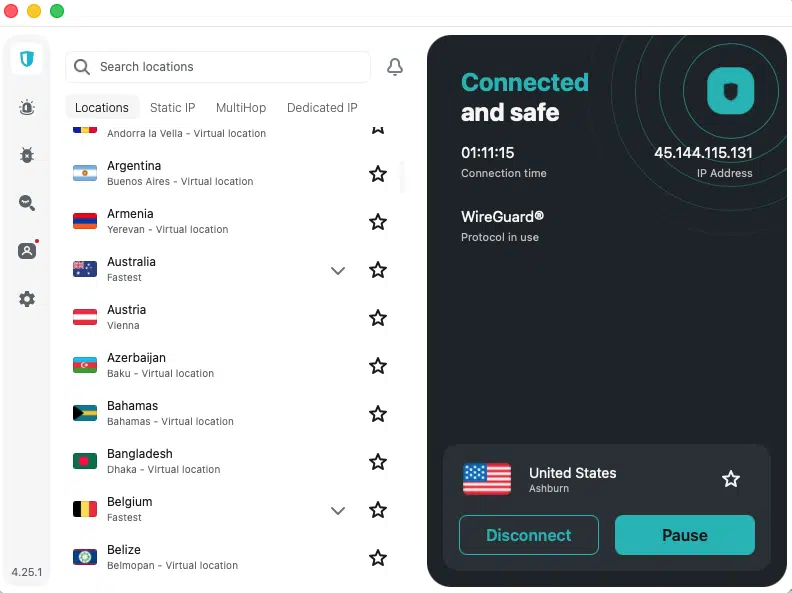
My first experience with Surfshark wasn’t great, to be honest. Signing up for the service and downloading the app on my Mac was easy. It took all of five minutes, and that included making the systems setting changes required of all VPN services. Surfshark’s app walked me through the process. Very easy.
But then I couldn’t connect to Surfshark’s VPN servers. I tried different locations within the U.S. No luck. I tried different countries. I tried different the different protocols Surfshark offers. Nothing worked.
So I reached out to Surfshark’s support via chat and . . . was amazed.
The support was instantaneous. In fact, it was so fast I assumed it was powered by AI. Maybe it was, but the responses were spot on. They walked me through a number of steps to try and fix the issue. The first few suggestions didn’t work. And then they suggested the universal solution to all IT issues–restart my computer.
It worked, and I haven’t had any issues since then.
Surfshark Packages
Surfshark offers three packages: Surfshark Starter, Surfshark One and Surfshark One+. All three of these packages include the following:
- VPN service on an unlimited number of devices
- Ad blocker
- Cookie pop-up blocker
- Rotating IP address
- Masked Email generator (so you don’t have to give out your actual email address)
I chose Surfshark One because it adds antivirus, email scam checker, data leak alerts and web content blocker features. One+ adds identify theft coverage, which I didn’t need.
Surfshark Starter’s two-year package is the least expensive. Check prices here.
Surfshark–Best low cost VPN
|
Website |
|
|
Location |
Netherlands |
|
Encryption Standard |
AES w/ 256-kit keys |
|
Logs |
No (audited by Deloitte Audit Lithuania) |
|
Kill Switch |
Yes |
|
Price |
From $1.99/mo. |
|
Server Network |
4,500+ servers in 100 countries |
|
Deal |
Where it shines
- Excellent ‘whole household’ practicality, especially if you have many devices to cover.
- Solid security defaults plus optional privacy extras when you want them.
- Consistently good performance for everyday browsing, work, and travel.
What to watch for
- Like every mainstream VPN, streaming success can vary by platform and region; you may need to switch servers.
- Keep your setup simple unless you have a specific reason to turn on advanced routing features.
Privacy and logging posture
Surfshark does not keep a log of its users’ activities. Its no-log policy was last audited in 2025 by Deloitte.
Security and leak protection
For most people, the safety checklist is straightforward: kill switch on, DNS leak protection, and a modern protocol like WireGuard when available. Surfshark’s apps make those controls easy to find. It also offers multi-hop connections – think of that as ‘two VPN servers instead of one’ – which can make tracking harder but can also slow things down.
Performance and reliability
Surfshark is usually fast enough that you stop thinking about it, which is the goal. If you feel slowdown, the fix is typically simple: pick a closer server or switch protocols. Most users never need to touch anything beyond that. I’ve never noticed a slowdown in internet speed when using Surfshark.
Streaming and travel usability
Surfshark can work well for streaming, but you’ll want to be comfortable switching locations when a service blocks a server. For travel, it holds up well on public Wi-Fi and helps keep your traffic harder to intercept.
Apps and user experience
The UI is clean, modern, and designed for non-technical users. Important toggles are labeled in plain language, and connection status is obvious. It strikes a good balance: approachable up front, but with enough depth when you go looking for it.
Closing thoughts
Bottom line: Surfshark is a practical, feature-rich VPN that fits real households – lots of devices, lots of networks, and people with mixed technical comfort levels. It’s also one of the least expensive VPN services available today.
