Best Bill Reminder Apps to Never Miss a Payment
We earn a commission from the offers on this page, which influences which offers are displayed and how and where the offers appear. Learn more here.
Late fees are the worst. A single missed payment can cost you $25 to $50—and if it dings your credit score, the real cost is even higher. The fix is simple: a bill reminder app that alerts you before every due date so nothing slips through the cracks.
After testing over a dozen personal finance apps, I’ve identified 5 that do bill reminders exceptionally well. Some are full-featured budgeting apps with built-in bill tracking, while others specialize in payment scheduling. I personally use Monarch Money, but each app on this list has strengths worth considering.
My Favorite Bill Reminder App
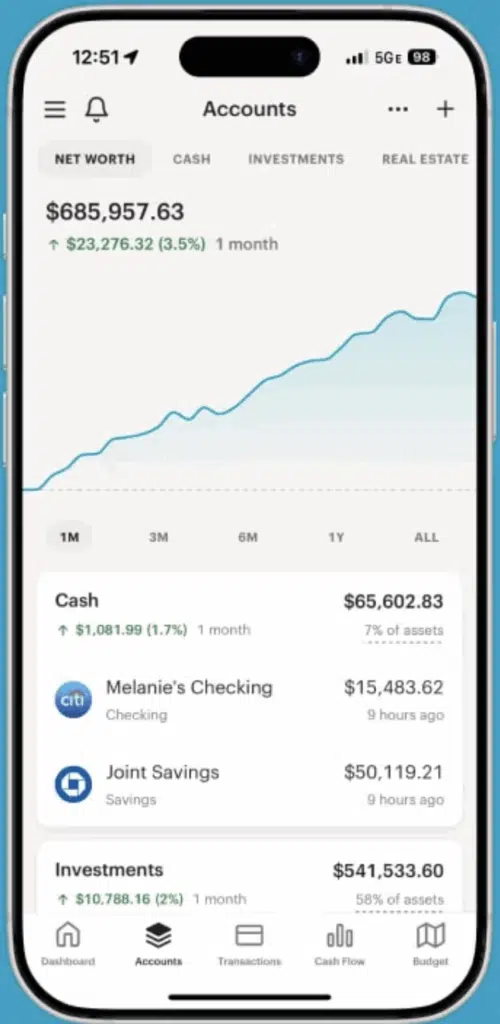
I’ve used Monarch Money to manage our finances for several years. Its calendar view shows every upcoming bill, recurring charge, and subscription in one place—color-coded by category so you can see at a glance what’s coming due this week. Clicking any upcoming expense reveals a pop-up showing the amounts over the last three months. You can also invite family members at no additional cost.
App Store Rating: 4.9 (88K reviews)
Android Rating: 4.8 (21.3K reviews)
Platforms: Apple iOS, Android or Web
Cost: 7-day free trial, then $8.33 per month when paid annually ($99.99/year), and get 50% OFF your first year of Monarch Money’s Core Plan with code ROB50
Best for: People who want bill reminders inside a full budgeting and net worth tracking app
On Monarch’s Website
5 Best Bill Reminder Apps
1. Monarch Money
Monarch Money is my top pick because it combines bill reminders with a complete financial picture. Its calendar view shows every upcoming bill, recurring charge, and subscription in one place—color-coded by category so you can see at a glance what’s coming due this week.
What sets Monarch apart from standalone bill reminder apps is context. You’re not just seeing that your electric bill is due Thursday—you’re seeing it alongside your checking account balance, your budget for the month, and your overall cash flow. That means you can spot trouble before it happens, not after.
Monarch automatically detects recurring transactions from your linked accounts and adds them to your calendar. You can also manually add bills that don’t auto-detect. Push notifications alert you before due dates, and you can customize how far in advance you want to be reminded.
- App Store Rating: 4.9 out of 5 stars among 85K iOS users.
- Google Play Rating: 4.7 out of 5 stars among 18K Android users.
- Price: $14.99/month or $99.99/year (50% off first year of Monarch Money’s Core Plan with code ROB50)
Key Features
- Calendar view with all upcoming bills
- Push notifications before due dates
- Automatic recurring transaction detection
- Budget tracking alongside bill management
- Net worth tracking and investment monitoring
- AI-powered financial assistant
💡 Use code ROB50 to get 50% off your first year of Monarch Money’s Core Plan.
2. Rocket Money
Rocket Money (formerly Truebill) takes a different approach to bill reminders. Rather than a calendar view, it builds a comprehensive list of every recurring charge it finds across your linked accounts—then sends you alerts before each one hits.
Where Rocket Money really stands out is its bill negotiation service. If it finds you’re overpaying for cable, internet, or phone service, it will negotiate on your behalf to lower your rate. It also tracks subscriptions you may have forgotten about and makes canceling them easy.
The free tier gives you basic bill tracking and reminders. The premium plan ($7-$14/month) adds bill negotiation, smart savings, and more detailed insights.
- App Store Rating: 4.5 out of 5 stars among 339K iOS users.
- Google Play Rating: 4.6 out of 5 stars among 117K+ Android users.
- Price: Free (basic) or $7–$14/month (premium)
Key Features
- Automatic detection of all recurring bills and subscriptions
- Due date reminders and alerts
- Bill negotiation service (premium)
- One-tap subscription cancellation
- Smart savings (auto-save toward goals)
- Spending insights and budget tracking
3. Quicken Simplifi
Quicken Simplifi handles bill reminders through its spending plan—a forward-looking view that shows your expected income minus upcoming bills minus planned spending. It’s a simple but effective way to make sure you always know what’s coming due.
When Simplifi detects a recurring bill from your linked accounts, it adds it to your spending plan automatically. You’ll see upcoming bills right on your dashboard, and the app sends reminders before each due date. The “watchlist” feature lets you flag specific bills or subscriptions for extra attention.
Simplifi is especially good for people who want a clean, simple interface. It doesn’t overwhelm you with features—it focuses on the essentials: what’s coming in, what’s going out, and what you have left to spend.
- App Store Rating: 4.5 out of 5 stars among 11K iOS users.
- Google Play Rating: 4.3 out of 5 stars among 4K+ Android users.
- Price: $3.49/month billed annually the first year, then $6.99/mo.
Key Features
- Spending plan with upcoming bills
- Automatic recurring transaction detection
- Bill reminders and notifications
- Clean, simple interface
- Available on iOS, Android, and web
4. Quicken Premier
Quicken Premier has been the gold standard for bill management since before smartphones existed. Its bill reminder system is one of the most robust available—you can set reminders for every recurring bill, customize alert timing, and even schedule payments directly through the app.
Quicken’s strength is its depth. Beyond reminders, it tracks your complete financial life: bank accounts, credit cards, loans, investments, and property. For people who want a single tool that handles bill reminders AND serious financial management, Quicken is a good option. The trade-off is complexity—it has a steeper learning curve than newer apps.
- App Store Rating: 4.6 out of 5 stars among 15K iOS users.
- Google Play Rating: 3.4 out of 5 stars among 14K+ Android users.
- Price: See Quicken website for current offers.
Key Features
- Customizable bill reminders with flexible timing
- Built-in bill pay (check and electronic)
- Comprehensive financial tracking
- Desktop and mobile apps
- Loan and mortgage tracking
- Tax reporting and year-end summaries
5. Origin
Origin takes a smart approach to bill reminders with its Recurring tab—a dedicated section that automatically collects all your subscriptions, memberships, and bills into one place. You get a rolling calendar view of upcoming charges, with daily spend summaries so you can anticipate the impact on your balance.
What makes Origin stand out is its AI assistant, Sidekick. It proactively alerts you about upcoming bills—even ones you’ve forgotten about. During my testing, it flagged a subscription I hadn’t thought about in months. Origin can also redirect you to cancellation pages for hundreds of common subscriptions if you decide to cut something.
Beyond bill tracking, Origin is a full financial planning platform with budgeting, investment tracking, and AI-powered financial advice.
- App Store Rating: 4.6 out of 5 stars among 3.1K iOS users.
- Google Play Rating: Available on Android.
- Price: $99/year, but get the first year for just $1
Key Features
- Recurring tab with automatic bill detection
- Calendar view of upcoming charges
- AI assistant (Sidekick) that flags upcoming bills
- Subscription cancellation links for hundreds of services
- Investment tracking and financial planning
- Works on iOS, Android, and web
What Is a Bill Reminder App?
A bill reminder app is any tool that tracks your recurring bills and alerts you before they’re due. At a minimum, it should notify you a day or two before each payment so you have time to make sure the funds are available. The best ones go further—automatically detecting recurring charges from your bank accounts, showing upcoming bills on a calendar, and even projecting your future cash flow.
Some bill reminder apps are standalone tools focused entirely on payment tracking. Others are full-featured budgeting apps (like the ones on this list) that include bill reminders as part of a broader financial management system. I generally recommend the latter, because seeing your bills in context—alongside your budget, spending, and account balances—gives you a much clearer picture of your finances.
Why Use a Bill Reminder App?
The most obvious reason is avoiding late fees. The average American pays around $150 per year in late fees, and that’s money you’ll never get back. But the hidden cost is worse: late payments reported to credit bureaus can drop your credit score by 50 to 100 points, which means higher interest rates on everything from car loans to mortgages.
Beyond avoiding penalties, bill reminder apps help you plan ahead. When you can see that your car insurance, mortgage, and electric bill all hit in the same week, you can make sure your checking account is ready. No more overdrafts, no more scrambling, no more stress about whether you forgot something.
If you’re juggling multiple accounts or managing bills for a household, a dedicated bill tracking tool is almost essential. It’s the difference between hoping you remember everything and knowing you won’t miss anything.
How We Chose the Best Bill Reminder Apps
I evaluated each app based on the following criteria:
- Bill detection: Does it automatically find recurring charges from linked accounts, or do you have to enter everything manually?
- Reminder quality: Does it send timely push notifications? Can you customize reminder timing?
- Visibility: Can you see upcoming bills at a glance—whether through a calendar view, spending plan, or dashboard?
- Context: Does the app show bills alongside your account balances and budget so you can plan?
- Ease of use: Is the interface intuitive or does it require a learning curve?
- Pricing: Is the cost reasonable relative to the value provided?
- Platform support: Does it work across iOS, Android, and web?
Bill Reminder App Comparison
| Bill Reminder App | Best For | Price | Free Tier |
|---|---|---|---|
| Monarch Money | Best overall bill tracking with calendar view | $99.99/yr, 50% off 1st year of its Core Plan with code ROB50 | No |
| Rocket Money | Free bill reminders + bill negotiation | Free tier; premium $7–$14/mo | Yes |
| Simplifi | Simple spending plan with bill tracking | $3.49/month billed annually the first year, then $6.99/mo. | No |
| Quicken Premier | Most comprehensive bill management + bill pay | See Quicken website | No |
| Origin | AI-powered bill alerts + calendar view | $1 first year; then $99/yr | No |
Final Thoughts
If you’ve ever paid a late fee because a bill slipped your mind, a bill reminder app will pay for itself almost immediately. My top recommendation is Monarch Money because it combines the best bill calendar view with full budgeting and net worth tracking. But if you want something free, Rocket Money‘s free tier gets you solid bill tracking and reminders without spending a dime.
